Cloned Gaming App: 7 Essential Checks to Spot a Fake Install
Most articles about a cloned gaming app make the same mistake: they name one specific fake and tell you to avoid it. That advice expires in weeks, because the people building clones rename, re-icon and republish faster than any blocklist can follow. What does not expire is the method of verification. A clone can copy an icon, a splash screen and even the full interface of a real gaming app, but it cannot copy the publisher’s signing identity, its store history, its download record or its original permission set.
This breakdown walks through seven checks built on those fixed points, answers the most common questions about how clones work, and explains what to do if money has already been deposited into one. Real-money gaming is for adults only (18+), and losses — not wins — are the statistically expected outcome of any such app, genuine or fake.
What a Clone Really Is, and What It Can Copy
A cloned gaming app is a repackaged or rebuilt application designed to be mistaken for a real one. In the simplest case, someone downloads the genuine installer, opens it with freely available tools, inserts their own code — a payment redirect, a credential logger, an ad module — and re-signs it with their own key. In other cases the clone is built from scratch: a lookalike interface wrapped around a completely different backend, so every rupee deposited and every password typed goes to the operator of the fake, not to the service you thought you were using.
The important thing to understand is the asymmetry. Everything you can see is cheap to copy: the icon, the name, the colour scheme, the lobby layout, even screenshots lifted directly from the original store listing. Everything that lives in the distribution system is expensive or impossible to copy: the developer account that published the original, the cryptographic certificate the original was signed with, the multi-year version history, and the accumulated download and review volume. Honest verification therefore ignores appearance entirely and reads only the hard signals.
That is also why this page names no brands. A check that says “avoid app X” is dead the moment app X is renamed to app Y. A check that says “the developer name on the update must match the developer name on the original install” works against every clone that will be published next month, because it tests something the cloner cannot forge without access to the original publisher’s account.
How Cloned Gaming Apps Reach Your Phone
A cloned gaming app rarely arrives by accident. Clones are pushed through channels that bypass or abuse the checks an official store performs, and almost every infection story starts with one of a handful of routes. Knowing the routes matters because the delivery channel is itself the first warning sign: a genuine gaming app has no reason to be distributed as a file forwarded in a chat group.
- Messaging-app forwards: an APK file or download link shared in a group chat, often framed as a “new version”, a “premium version” or a version with better rewards.
- Lookalike websites: pages that imitate an official download portal, reached through search ads, shortened links or SMS messages, offering a direct APK instead of a store page.
- Third-party app stores and APK mirrors: repositories with little or no signature verification, where anyone can upload a repackaged build under a familiar name.
- Social media promotion: short videos and posts promising sign-up gifts or referral income, with an install link in the bio or comments rather than a store listing.
- Clones inside official stores: rarer and usually short-lived, but a fake with a near-identical name and icon can pass initial review and sit on a real store until it is reported and removed.
The common thread is urgency plus a sideload. If an installation requires you to enable “install from unknown sources”, or the link arrives with a deadline (“bonus valid today only”), treat that pressure itself as evidence. Legitimate publishers gain nothing by rushing an install; cloners depend on it, because every one of the checks below takes a few calm minutes that panic installation skips.
Checks 1 and 2: Install Source and Publisher Identity
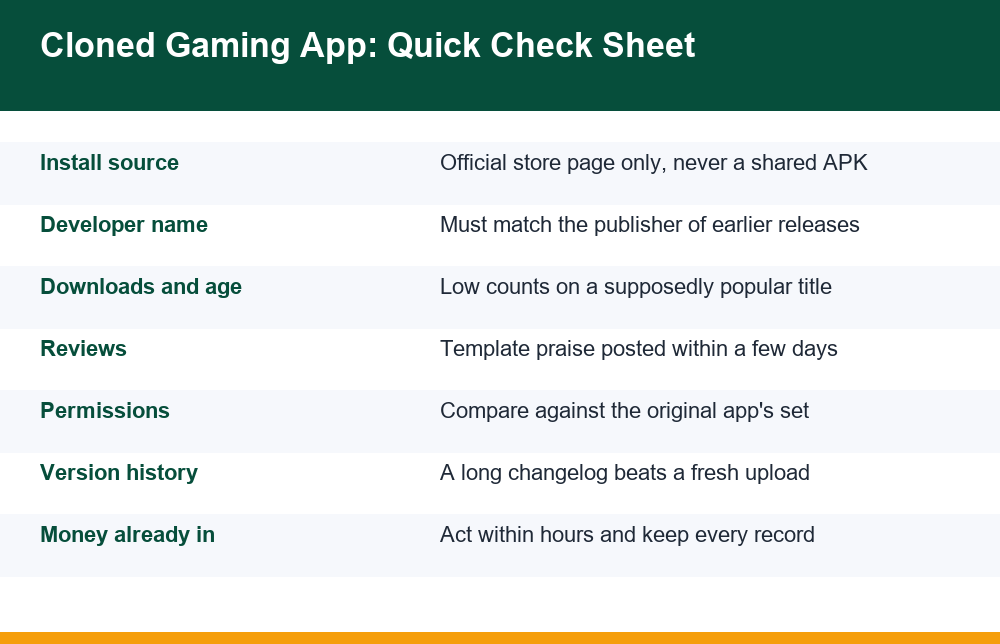
Check 1: where the file actually came from
The first check is brutally simple: did this app install from an official store page you navigated to yourself, or from anywhere else? “Anywhere else” includes a link someone sent you, even if that link eventually opened a page that looked like a store. Open your phone’s settings, find the app in the application list, and look for the install source — modern Android versions show which store or installer delivered the package. An app that claims store pedigree but shows a browser or file manager as its installer was sideloaded, whatever its icon says.
Check 2: who really published it
Every store listing names a developer, and that name links to the publisher’s other apps. Open it. A genuine publisher of a long-running gaming app has history: earlier releases, a consistent naming pattern, usually a working website and support email. A cloner’s account is typically days or weeks old, holds one or two apps, and uses a name that is almost the expected one — an extra word, a swapped letter, “Official” or “Ltd” bolted on. If you have an older genuine install on another device, compare the developer names character by character; a mismatch between two “versions” of the same app is conclusive, because developer identity is tied to the signing key and cannot drift between honest updates.
On Android you can go one step deeper. The package name — the reverse-domain identifier like com.example.game — is permanent for a genuine app across every update. Settings > Apps shows it, and several built-in “app details” screens expose it directly. A cloned gaming app must use a different package name (or a different certificate under the same name, which the operating system flags as a corrupt or conflicting install). Either tell is definitive in a way no icon comparison ever is.
Checks 3 and 4: Listing Tells and Version History
Check 3: numbers that cannot be faked quickly
Download counts, review volume and listing age accumulate slowly, which makes them expensive signals for a cloner. An app presenting itself as a popular, established title but showing a few thousand downloads, a few dozen reviews and a publication date within the last month is contradicting its own story. Read the reviews with dates visible: a wall of five-star, one-line praise posted within the same week is a purchased batch, and the few genuine reviews underneath — often one-star reports of blocked withdrawals or sudden logouts — are the ones that describe reality.
Check 4: icon precision and changelog depth
Clones usually get the icon almost right: slightly different corner radius, wrong shade, a missing gloss detail, or a current icon on an app that claims years of history during which the real icon changed. More reliable than squinting at pixels is the version history. A genuine app that has existed for years shows a long changelog with incremental version numbers; a clone shows version 1.0 or 1.1 and a single “bug fixes” entry. If the app arrived as a direct APK, check the file size too — a repackaged build often differs noticeably from the size the official listing states, because code has been added or stripped.
None of these soft tells is proof alone. Their job is triage: any one of them is reason to treat the install as a possible cloned gaming app, stop, and run the hard checks — publisher identity, package name, and the permission comparison below — before the app is opened, and certainly before anything is typed into it.
Checks 5 and 6: Permission Sets and In-App Behaviour
Check 5: compare the permission list, not just its length
Why do clones ask for extra permissions? Because the clone’s real business is not gaming — it is harvesting. A gaming client needs network access, storage for its own files, and little else. A clone built to intercept one-time passwords needs SMS access; one built to monitor you needs contacts, call logs, accessibility services or device-admin rights. Before first launch, open the app’s permission page in system settings and compare it against the official listing’s declared permissions. What each individual permission actually exposes is covered in the plain-language breakdown of gaming app permissions; for clone detection the key point is the difference between the two lists, because a cloner cannot remove their harvesting permissions without disabling the harvest.
| Permission requested | Typical in a genuine gaming client | In a clone, usually means |
|---|---|---|
| Internet / network state | Yes — required | Same, plus traffic to unknown servers |
| Read / receive SMS | Almost never | OTP interception for account or bank access |
| Contacts | Rarely, and only with a stated reason | Harvesting numbers for further spam targets |
| Accessibility service | No | Screen reading and automated taps across other apps |
| Install packages | No | Pulling additional payloads after install |
| Device admin | No | Resisting uninstallation and locking the screen |
Check 6: behaviour in the first five minutes
A cloned gaming app often betrays itself immediately after launch. Typical tells: it demands a deposit before showing any content a genuine app shows for free; its payment screen jumps to a personal UPI handle or an individual’s bank account instead of a named gateway; recharge requests route through chat with an “agent”; the version number inside the app disagrees with the store listing; or it immediately prompts you to download a further “update” from a browser link. Any payment flow that terminates at an individual’s account is decisive — no legitimate operator of any size settles deposits into personal accounts.
Check 7: Can a Cloned Gaming App Steal Logins and OTPs?
Yes — and this is the risk that outlasts any single deposit. A clone controls every pixel it draws, so the “login” screen you see is simply a form that sends whatever you type to the clone’s operator. If you entered the same email-and-password pair you use elsewhere, every account sharing that pair is now exposed. The visual tells of a counterfeit sign-in form — and the habit of never trusting a login screen because of how it looks — are covered in detail in this walkthrough of spotting fake login pages, and everything there applies doubly inside an app you did not verify.
One-time passwords deserve specific attention. A clone can capture an OTP two ways: by asking you to type it into its own interface, or — if it obtained SMS permission at install — by reading the message directly, silently, with no typing needed. That second route is why the permission comparison in check 5 is not pedantry. An OTP typed into or read by a clone can be relayed in real time to complete a genuine login or payment authorisation on the real service while you watch a fake loading spinner.
The practical rule: credentials entered into a suspected clone are compromised the moment they are entered, regardless of whether anything bad has visibly happened yet. Change that password everywhere it was reused, starting with the email account itself, and do it from a different, trusted device — not from the phone still carrying the clone.
What to Do If You Deposited Into a Clone
If money has already gone in, speed matters more than certainty. You do not need to prove the app was fake before acting; you need to create records and raise flags while the transaction is still fresh, because recovery mechanisms work best in the first hours. Work through the steps in order, and resist the single most common mistake at this stage: paying again. Clones routinely respond to withdrawal attempts with a “verification fee”, “tax” or “unfreeze charge” — that second payment is the actual scam, engineered to arrive exactly when you are most anxious to recover the first one.
- Capture evidence immediately: screenshots of the app, its store or download page, payment confirmations, transaction IDs or UTR numbers, and any chat with “support” or “agents”.
- Contact your bank or payment provider through the number on your card or official banking app — never a number the gaming app showed you — and report the transaction as fraudulent.
- Report it to the official cybercrime channel for your country. In India, that is the national reporting portal at cybercrime.gov.in, which handles online financial fraud complaints and is paired with the 1930 helpline for urgent financial cases.
- Secure your identity: from a clean device, change the passwords for any account whose credentials touched the clone, and enable two-factor authentication where available.
- Remove the app only after evidence is captured, then follow the clean-up sequence in the final section below.
Be honest with yourself about the likely outcome: money sent to a cloned gaming app is often unrecoverable, and the realistic goals are limiting further loss, protecting your accounts, and creating the formal record that reporting channels need. If your genuine account on the real service was also compromised through reused credentials, the separate step-by-step process for recovering a gaming account covers that side of the damage.
Does Reinstalling From the Official Store Fix It?
Partially — and the gap between “partially” and “fully” is where people get hurt twice. Installing the genuine app from the official store gives you a clean client going forward, but it does nothing about what the clone already took or left behind. Reinstalling does not revoke an accessibility service the clone enabled, does not remove a secondary payload it installed, does not un-steal a password, and does not reverse a payment. Treat the reinstall as the last step of a sequence, not the fix itself.
The full clean-up: uninstall the clone (after capturing evidence); check settings for any accessibility services, device-admin apps or unfamiliar installed apps it may have added, and remove them; run the device’s built-in app-scanning feature; change compromised passwords from a trusted device; then install the genuine app from the official store page, reached by typing the store search yourself rather than following any link. If the clone held device-admin rights that resist removal, or you cannot be confident the device is clean, a factory reset — after backing up personal files — is the reliable end point.
Verification is a five-minute habit, and it is the only one in this whole subject that reliably pays. Nothing inside any real-money gaming app changes the underlying arithmetic — the margin is built so that losses are the expected result over time, and no method of play alters that. But whether the app you typed your password into is the one you think it is? That is entirely checkable, every single time, using nothing more than the seven checks above.
Frequently Asked Questions
How do cloned gaming apps reach my phone?
Mainly through sideloading channels: APK files forwarded in messaging groups, lookalike download websites reached via ads or SMS links, third-party app stores with weak verification, and social media posts promising bonuses. Occasionally a clone briefly appears on an official store under a near-identical name before being removed. Any install that required enabling “unknown sources” or arrived with time pressure deserves suspicion.
Can a cloned app steal my login and OTP?
Yes. A clone controls its own login screen, so anything typed into it goes straight to the operator. If it obtained SMS permission, it can also read one-time passwords silently and relay them in real time to authorise logins or payments on the genuine service. Treat any credentials entered into a suspected clone as compromised and change them from a different, trusted device.
How do I check who really published an app?
Open the developer name on the store listing and review the account: a genuine publisher shows years of history, multiple consistent releases and working contact details, while a cloner’s account is new with one or two apps and a slightly altered name. On Android, also compare the package name (the com.example-style identifier in Settings > Apps) — it never changes across genuine updates, so a mismatch is conclusive.
Why do clones ask for extra permissions?
Because harvesting is their real function. A genuine gaming client needs little beyond network access, but a clone built to intercept OTPs needs SMS access, and one built for deeper control requests contacts, accessibility services or device-admin rights. Comparing the installed app’s permission list against the official listing’s declared permissions exposes exactly this difference.
What should I do if I deposited into a clone?
Act within hours: screenshot everything including transaction IDs, report the payment as fraudulent to your bank through its official contact channels, and file a complaint with your country’s cybercrime reporting channel — in India, the portal at cybercrime.gov.in and the 1930 helpline. Never pay any “verification fee” or “unfreeze charge” demanded to release a withdrawal; that follow-up demand is itself the scam.
Does reinstalling from the official store fix it?
Only partially. A fresh official install gives you a clean client but does not undo stolen credentials, remove extra payloads or accessibility services the clone enabled, or reverse payments. First uninstall the clone, check for and remove unfamiliar apps and device-admin entries, run the device’s app scan, change compromised passwords from a trusted device, and only then reinstall from the official store. A factory reset is the reliable option if the device cannot be trusted.
