Gaming Account Recovery: 6 Easy Steps When You Are Locked Out
Gaming account recovery comes down to one question: which of the three things did you actually lose — the password, the registered mobile number, or access to the account itself? Each answer leads to a different door, with different requirements and a very different timeline. Searches on this topic are crowded with pages that blur those three situations together, and worse, with people selling “recovery services” that cannot deliver what they promise.
This breakdown walks the full lockout tree step by step: what each path needs from you, why one-time passwords can never be reset by support, what proof a verification team will realistically accept, and how to lock the account down properly once you are back in. A brief honesty note before we start: these apps involve real-money play, which is for adults only and carries real risk of loss — getting an account back is a troubleshooting matter, not an endorsement of what is in it.
The Short Answer
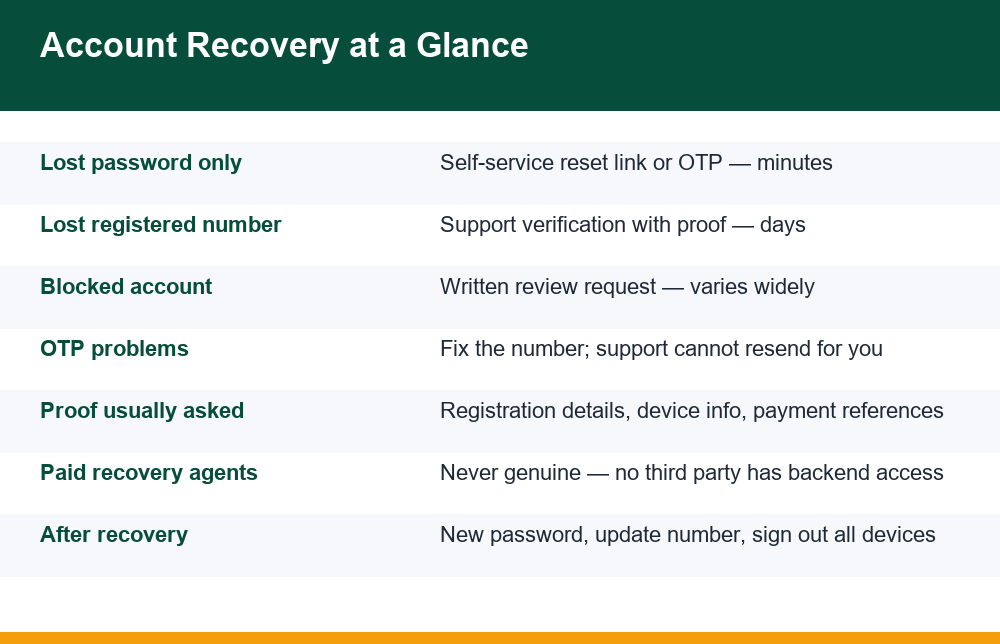
If you still control the registered mobile number or email, you do not need anyone’s help: use the Forgot Password flow, receive the reset code, set a new password, and you are done in minutes. If you lost the registered number, you must contact official in-app support and prove the account is yours, which takes days rather than minutes. If the account has been blocked by the app, you must request a review in writing and wait. There is no fourth path. Nobody outside the app’s own support team can restore access, and no payment to a third party changes that.
That is the whole map. Gaming account recovery is, in other words, a sorting problem before it is a technical one — and the rest of this page earns that map: what each path looks like in practice, where people get stuck, and which dead ends waste the most time and money. The structure matters because mixing the paths up is the single most common mistake — people with a simple lost password write long emails to support, while people who lost their SIM keep hammering a reset button that sends codes to a number they no longer own.
One principle sits underneath everything here: a one-time password is not a credential that support stores and can look up. It is generated fresh, sent to the registered number, and expires. That design is why recovery always routes through either the number you control or a manual identity check — there is no secret third option a clever agent can unlock.
The 6 Steps in Order
Whatever the cause of the lockout, the same ordered sequence applies. Running it in order prevents the two classic time-wasters: contacting support for something you could fix yourself in two minutes, and repeatedly retrying a self-service flow that structurally cannot work for your situation.
- Diagnose what you lost. Password only? Registered number or SIM? Or does the app say the account is blocked, suspended or under review? Read the exact on-screen message carefully — it tells you which path you are on.
- Try the self-service reset once. Use Forgot Password with the registered number or email. If the code arrives, finish there. If it does not arrive, troubleshoot delivery before assuming the worst — signal, SMS inbox filters and DND settings cause most failures.
- Confirm you are on the real app or site. Before typing anything sensitive into a login or recovery form, be certain it is the official one and not a lookalike built to harvest exactly these moments of panic.
- Gather your proof. Registration date, the number or email used at signup, device model, approximate last login, and payment or transaction references if the account had a wallet. Collect these before contacting support, not during.
- Contact official in-app or in-site support only. Use the help channel inside the app or on the official website — never a number or handle found in a search result, social media comment or forwarded message.
- Follow one thread patiently. Submit the request once, note any ticket or reference ID, and reply on the same thread. Opening five parallel tickets resets your place in the queue and makes verification slower, not faster.
Steps one and two resolve the majority of lockouts without any human involvement. Steps four to six are only needed when the registered number is gone or the account is blocked — the two slow paths covered next. Keep the sequence in mind even if your case feels urgent: skipping ahead to support with incomplete information is the slowest route of all, because every missing detail adds another round trip to the exchange.
Path 1: You Lost the Password
This is the easy path, because the app can still reach you. Tap Forgot Password on the login screen, enter the registered mobile number or email, and the app sends a one-time code or reset link. Enter it, choose a new password, and access is restored. No support ticket, no proof, no waiting.
Where it goes wrong is almost always code delivery, not the reset flow itself. The code is sent, but it never appears on the phone: blocked promotional SMS, a full inbox, a third-party SMS app filtering it to spam, poor signal, or a recent SIM swap that has not fully activated. If the reset code refuses to arrive, work through the delivery checklist in our breakdown of why an OTP does not arrive on a gaming app and how to fix delivery before concluding that you need support.
Two details worth knowing. First, reset codes expire quickly — usually within a few minutes — so request one only when you are ready to use it, and do not request several in a row, because many apps temporarily lock the reset function after repeated requests. Second, if the reset flow offers a choice between SMS and email, pick whichever channel you are most certain you still control. A reset link sent to an email you can open beats a code sent to a number with patchy signal.
Path 2: You Lost the Registered Number
This is the path people dread, and the one that generates the most confusion about gaming account recovery. The registered number is the anchor of the whole login system: codes go to it, resets route through it, and the app treats whoever holds it as the owner. Lose the SIM — through loss, deactivation, porting gone wrong, or simply changing numbers years ago — and the self-service flow is structurally closed to you. No amount of retrying the reset button will help, because every code it sends lands on a number you cannot read.
Before contacting the app, consider the telecom route: if the number was lost recently (a lost phone or damaged SIM rather than a long-abandoned number), your mobile operator can often issue a replacement SIM for the same number at a store with identity verification. If that works, you are quietly back on Path 1 and can reset the password yourself the same day. This is usually faster than app support and is worth checking first.
If the number is genuinely gone for good, the only remaining door is the app’s official support channel. You will be asked to prove ownership of the account (see the proof section below), and once verified, support updates the registered number to your new one — after which normal resets work again. The requirements and sequence for that update are covered in detail in our step by step piece on changing the registered mobile number on a gaming app. Expect this path to take days, because a human has to review what you submit, and expect stricter checks if the account holds a wallet balance — slower here is actually the system working as intended.
Path 3: The Account Is Blocked
Sometimes the password and number are fine, but the app itself has shut the door: a message saying the account is blocked, suspended, frozen or under review. This is not a technical failure, so no reset flow fixes it. Common triggers include logins from many devices in a short window, multiple accounts tied to one identity or device, chargebacks or payment disputes, long inactivity, or activity the platform’s automated systems flagged as unusual. The block message occasionally says which, but often does not.
The only productive move is a written review request through the official support channel. Keep it short and factual: the registered number or username, when you lost access, the exact message shown, and a plain statement of what you were doing around that time. Ask what information they need from you rather than arguing. Decisions on blocks are made by the platform’s own review process, and the outcome ranges from quick restoration to a permanent closure — there is no external mechanism that can force a different answer.
If the account had a wallet balance, ask specifically — in the same thread — what happens to that balance and what the withdrawal procedure is if the account is not restored. Get the answer in writing inside the ticket. And treat an unexplained block as a prompt to check whether the account was compromised: if someone else triggered the block from inside your account, the security steps at the end of this page matter even more.
What Proof Apps Ask For
Manual verification is the heart of every slow recovery path, so it is worth knowing in advance what a support team can actually check. The principle is simple: they will ask for things only the genuine owner would know, and they will cross-check your answers against what their system recorded. Guessing does not work, and volunteering accurate detail up front is what makes gaming account recovery fast instead of a week of back-and-forth.
| Proof item | Why it is asked | Where to find it |
|---|---|---|
| Registered mobile number or email | Primary key to locate the account | Old SMS, email inbox, signup-era notes |
| Approximate registration date | Confirms history only the owner knows | First welcome SMS or email from the app |
| Device make and model used | Matched against login records | Your phone settings, old phone details |
| Last successful login (rough date) | Cross-checked with access logs | Your own memory, notification history |
| Payment or transaction references | Strongest ownership signal for wallet accounts | Bank or UPI statement entries, payment-app history |
| New number and ID for re-binding | Needed when the registered number changed | Your current SIM and identity document |
Two cautions. First, only submit proof inside the official in-app or on-site support channel — never to an email address or chat handle that approached you. Second, a genuine support team never needs your password or a live OTP to verify you; those two items are the one thing you should refuse to share with anyone, including someone claiming to be support, because real verification runs on the historical facts in the table, not on your credentials.
Why Paid Recovery Offers Are the Wrong Door
Search for account help, or post about a lockout in any public group, and offers appear: an “agent” who can unlock any account, a “senior support manager” on a messaging app, a paid tool that bypasses verification. Every one of these is the wrong door, for a structural reason rather than a moral one: account access lives in the platform’s backend, and nobody outside the platform’s own staff can touch it. A third party has exactly two possibilities — they have no access and take your fee for nothing, or they walk you through the official process you could have used free. There is no third possibility in which an outsider genuinely flips a switch.
The pattern is worth spelling out because it preys on urgency. The typical sequence: a small upfront fee, then a “processing charge”, then a request for the OTP that just arrived on your phone — which, if shared, hands over whatever account the code was protecting. Some operations skip the fee entirely and go straight for credentials by sending a login link to a lookalike page. The common thread is that each step is small enough to feel reasonable while you are anxious.
- No genuine platform charges money to restore access — official recovery is free in every mainstream app.
- No genuine support agent initiates contact through personal numbers, social media DMs or messaging-app forwards.
- No genuine verification ever requires you to read out an OTP or share a password.
- Anyone promising “guaranteed unlock” of a blocked account is promising something the platform’s own staff cannot guarantee.
- Paying does not create access; it creates a second problem on top of the first.
If you have already paid such an operator or shared codes with one, treat it as fraud rather than a failed service: preserve the chat and payment records and report it through the National Cybercrime Reporting Portal at cybercrime.gov.in, which handles online financial fraud complaints. Then change the passwords on everything the shared information could touch.
How Long Gaming Account Recovery Takes
Timelines are the question support teams get asked most, and the honest answer is that gaming account recovery time depends entirely on which path you are on, because each path involves a different amount of human review. Self-service is instant; anything involving a person is not.
- Lost password, number still works: minutes. The flow is fully automated end to end.
- Replacement SIM for the same number: usually same day through your mobile operator, after which the password reset is again minutes.
- Lost number, support re-binding: typically a few working days — one round to submit proof, one for review, one to confirm the new number. Incomplete first submissions are the main cause of longer waits.
- Blocked account review: the widest range, from a day to several weeks, because it depends on why the block was applied and the platform’s review queue. Some blocks are not lifted at all.
- Wallet-related checks: add extra days on any path, since balances trigger stricter verification.
You can shorten the human-review paths meaningfully by doing three things: submit every proof item in your first message rather than drip-feeding, reply on the same ticket thread, and answer follow-up questions the same day. You cannot shorten them by opening duplicate tickets, messaging on multiple channels at once, or paying anyone — the first two reset queues, and the third was covered in the previous section. If a week passes with no reply at all, one polite follow-up on the same thread quoting the ticket ID is reasonable; a daily barrage is counterproductive.
Securing the Account After You Get It Back
Getting back in is half the job. The other half is making sure the same lockout — or a worse one, where someone else is inside the account — cannot happen again. Do this immediately while the recovery is fresh, not next week.
Set a new password that you use nowhere else, and store it in a password manager or written record you will actually find again — a surprising share of lockouts are simple forgetfulness repeated. Confirm the registered mobile number and email shown in the profile are ones you currently control, and update them the moment you plan a SIM change rather than after the old number dies. Then use the app’s sign out of all devices or active sessions option if it has one, so any session opened by someone else is cut off. Enable any extra verification the app offers, and review linked payment methods while you are there, removing anything you no longer recognise or use.
Finally, harden the habits that caused the lockout risk in the first place. Make sure OTP delivery to your number is reliable rather than intermittent, and learn to recognise counterfeit login screens before you ever type credentials into one — our checklist on spotting fake login pages before you enter your details covers the telltale signs. An account whose registered number is current, whose password is unique, and whose owner only ever logs in through the genuine app rarely needs recovering at all — the quiet goal of gaming account recovery is making the next one unnecessary.
Frequently Asked Questions
How do I recover a gaming account without my old number?
First check whether your mobile operator can issue a replacement SIM for the same number — if so, the normal password reset works again the same day. If the number is gone for good, contact the app’s official in-app support, prove ownership with registration details, device information and payment references, and ask them to re-bind the account to your new number. Expect this to take a few working days of manual review.
Why will support not reset my OTP?
Because an OTP is not stored anywhere to reset. It is generated fresh for each login attempt, sent to the registered number, and expires within minutes. Support cannot read it, reissue it to a different number, or bypass it — by design, control of the registered number is the proof of ownership. If OTPs are the problem, the fix is always on the number side: delivery settings, SIM status, or formally changing the registered number through verification.
What proof do apps ask for in account recovery?
Typically the registered mobile number or email, the approximate registration date, the device make and model you used, a rough date of last login, and — for accounts with a wallet — payment or transaction references that match their records. For number changes, a new number and an identity document may also be requested. Genuine support never asks for your password or a live OTP.
Can a recovery agent really unlock my account?
No. Account access is controlled in the platform’s own backend, which no outside agent can reach. A paid agent either takes the fee and delivers nothing, or walks you through the free official process. Many such offers are outright scams that escalate from fees to requests for your OTP or credentials. If you have paid one or shared codes, keep the records and report it at cybercrime.gov.in.
How long does account recovery usually take?
A password reset with a working registered number takes minutes. A replacement SIM for the same number is usually same day. Re-binding an account to a new number through support typically takes a few working days. Blocked-account reviews range from a day to several weeks, and wallet balances add extra verification time on any path. Complete first submissions and single-thread replies are what keep gaming account recovery short.
How do I secure the account after getting it back?
Immediately set a unique new password, confirm the registered number and email are current, sign out of all devices or active sessions, enable any extra verification the app offers, and review linked payment methods. Keep the registered number updated before any SIM change, and only log in through the genuine app or site, never through links sent to you.
