Gaming App Data Privacy: 6 Essential Facts About Your Data
Almost every page about gaming app data privacy gets the same thing wrong at the very first step: it treats privacy as a reading comprehension problem. Open the privacy policy, the advice goes, and you will know what happens to your information. In practice the policy is the least informative document in the chain.
The real exposure sits somewhere else entirely — in the permissions the app holds on your handset, in the third-party software kits bundled inside the installer, and in the stream of small behavioural events that leave your phone every few seconds while you have the app open. None of that is hidden, exactly. It is just described in language so broad that the document ends up telling you almost nothing. This breakdown works the other way round: it starts from what a phone actually hands over, then shows you where to look and what you can switch off.
What Gaming App Data Privacy Actually Means on a Phone
When people talk about privacy in the context of a mobile app, they usually picture a database somewhere holding their name and phone number. That exists, but it is the smallest part of the picture. A better mental model is that an installed app sits inside your phone’s operating system and can ask the system questions. Every question it is allowed to ask returns a piece of data, and the answers are often far more specific than the question sounds.
Three separate layers are in play, and confusing them is why so much online writing on this topic goes nowhere. The first layer is data you type in yourself: an email address, a mobile number, a date of birth, payment details, documents uploaded during verification. The second is data the operating system hands over: device model, screen size, Android version, network carrier, language, time zone, battery state, and a resettable advertising identifier. The third is data generated by your behaviour inside the app: which screens you opened, in what order, how long you lingered, what you tapped and did not tap, how often you return, and at what hours.
The second and third layers are where the volume is. They also require no dramatic permission dialogue — much of it is available to any app by default, because the system treats it as non-sensitive. That is the honest starting point for gaming app data privacy: the sensitive-looking prompts are not the main channel, and refusing them does not switch the stream off.
It helps to separate the idea of an identifier from the idea of an identity. An identifier is any stable string that lets a system recognise the same device or account twice — an advertising ID, an install ID, a push token, a hashed email address. It does not contain your name, and that is exactly why it is useful: it travels freely between companies without looking like personal information, while still doing the job a name would do. Most of what people find uncomfortable about app tracking is not that a company learned their name. It is that an identifier they never saw let several unrelated companies describe the same person.
Real-money gaming apps add one more wrinkle. Because they handle deposits and withdrawals, they typically collect identity documents and bank or wallet details, which are the hardest categories to have removed later. That makes the decision to install a heavier one than it is for a puzzle game, and it is worth understanding before you create an account rather than after.
What Personal Data Gaming Apps Collect From Your Phone
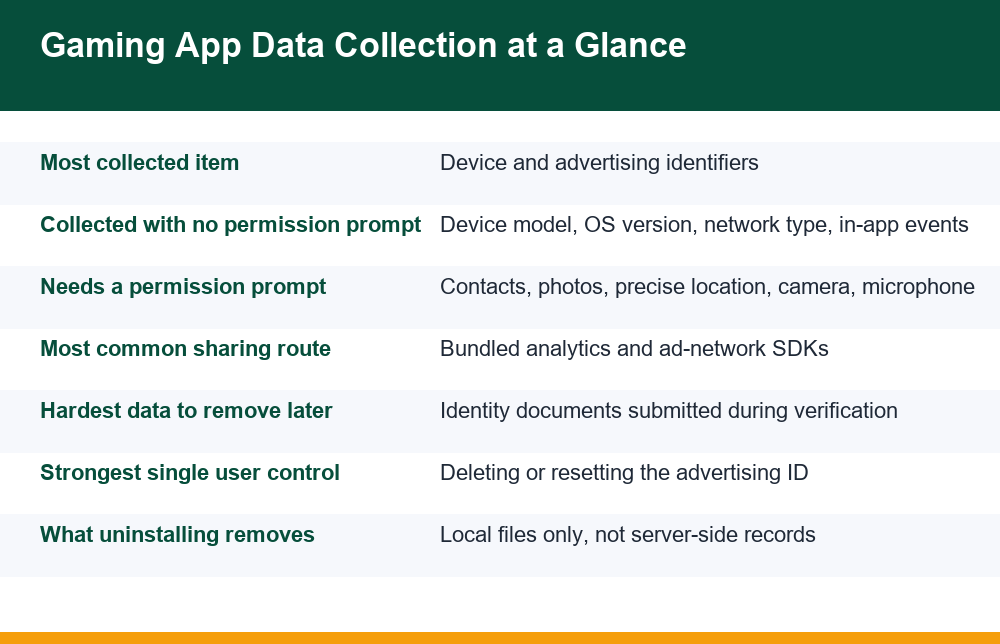
Here is the practical answer to the question people actually ask. The table below groups the common categories, how each one typically reaches the app, what it is generally used for, and whether you have any say in it. Treat it as a map of where to aim your attention, not as a claim about any particular app — the mix varies, and the only way to know for a specific installer is to check its own disclosures.
| Data category | How it reaches the app | Typical purpose | Can you refuse it? |
|---|---|---|---|
| Device identifiers (advertising ID, install ID) | Handed over by the OS automatically | Linking sessions, attributing installs to ad campaigns | Partly — the ad ID can be deleted or reset |
| Device and network profile (model, OS version, carrier, language) | Automatic, no prompt | Compatibility, fraud scoring, rough geography | No |
| Approximate location | Derived from IP address or network | Regional content, fraud checks | Not practically |
| Precise location | Permission prompt | Location-based features, ad targeting | Yes — deny or set to approximate |
| Contacts | Permission prompt | Invite and referral mechanics | Yes — deny |
| Photos and media | Permission prompt or system picker | Profile images, document uploads | Yes — prefer the one-time picker |
| Usage and interaction events | Built into analytics SDKs | Product analytics, retention modelling, ad optimisation | Rarely, and only where an in-app toggle exists |
| Account details you enter | Typed by you | Account creation, support, communication | Yes — by not signing up |
| Identity documents and financial details | Uploaded by you during verification | Identity and payment checks | Only by not completing the process |
| Notification and push tokens | Issued on first launch | Re-engagement messaging | Yes — revoke notification permission |
Two rows deserve emphasis. The usage and interaction events row is the one most privacy write-ups skip, and it is the largest in raw volume: a single session can generate a large number of small event records. And the identity documents row is the one with the longest tail, because documents submitted for account checks tend to be retained under financial record-keeping practices long after you stop using a service. If you want a closer look at how that process works and what it asks for, our breakdown of what identity verification in gaming apps involves walks through it step by step.
It is also worth knowing how this data physically leaves the handset, because it explains why you rarely notice it. Analytics kits do not send one request per tap. They buffer events in local storage and flush them in batches — on a timer, when the app goes to the background, or when the device reconnects to a network. That is why an app that appears to be sitting idle can still produce outbound traffic, and why turning off mobile data for a session does not prevent the events being sent later. The collection already happened on the device; the transmission is just delayed.
One more category rarely appears in app-store listings at all: data inferred rather than collected. If an app knows your device model, your active hours, your session lengths and your spending pattern, it can estimate things you never typed — approximate age band, income bracket, likely responsiveness to a particular prompt. Inferred data is not usually listed anywhere, because technically nothing was collected to produce it. This is the part of gaming app data privacy that no disclosure form captures, and it is worth holding in mind whenever a listing looks reassuringly short.
Can Gaming Apps Share or Sell Your Data to Third Parties?
Sharing is normal, routine and usually invisible. It happens because almost no app is built entirely in-house. Developers assemble apps partly from software development kits — prepackaged components for crash reporting, analytics, push notifications, payment handling, attribution and advertising. Each kit is code from another company running inside the app, with access to whatever the app has access to. When an analytics kit records that you opened the deposit screen, that record goes to the kit’s provider, not only to the developer.
This is why the phrase “we do not sell your data” can be literally true and still leave a wide sharing footprint. Selling and sharing are different things. A developer may never transfer a dataset for money while still routing event streams through four or five external providers as an ordinary part of operating the app. The policy language that covers this is usually some variant of “service providers”, “partners” or “affiliates”.
What this means in practice for gaming app data privacy is that your identifier can be the join key across unrelated apps. If two different apps both report the same advertising ID to the same ad network, that network can see both sets of behaviour as one profile. You never consented to the combination, because no single app asked for it. The combination is an emergent property of the shared identifier.
The practical consequence is easier to feel than to describe. Install an app, open it twice, and you may start seeing promotion for a completely different app in the same category somewhere else on your phone. Nothing mysterious happened. One network saw the same identifier in two places and treated the behaviour as one person’s. It also means that deleting one app does not shrink the profile much, because the profile was never stored in that app — it lives with the network, keyed to the device.
There is also a less technical sharing route worth naming plainly: people hand data to lookalike apps and messaging channels that imitate a real service. Fake installers distributed outside official app stores, support channels that ask for a one-time password, and “verification” forms that request a full card number are all data-collection mechanisms dressed as something else. We describe these here only so you can spot them, never as a suggestion to engage. If something you installed or were contacted by behaves this way, treat the prompt as hostile and stop. India’s Cyber Swachhta Kendra publishes free device-hygiene and malware removal tools through the government’s botnet cleaning centre, which is a sensible place to start if you suspect something is wrong with a handset.
How to Check What Data an App Collects Before Installing It
You can learn most of what you need in about four minutes, and none of it requires reading a policy end to end. The checks below are ordered by how much information they return per minute spent.
- Open the Data safety section on the store listing. On Google Play, every listing has a Data safety card that the developer fills in. Expand it fully rather than reading the summary. You are looking at two columns: data collected and data shared. The shared column is the more revealing one.
- Note anything that does not fit the app’s function. A card game that reports precise location and contacts is telling you something about its business model. Mismatch between function and collection is the single clearest signal available before install.
- Check whether data is described as linked to you. Listings distinguish between data collected anonymously and data tied to your identity. The same category means very different things in each case.
- Look at the requested permissions list. Store listings expose the full permission set the app declares, including ones you will never see a prompt for. A long list of declared permissions on a simple app is a flag.
- Scan the policy for three words only. Open the linked privacy policy and search for “retention”, “delete” and “third”. Those three searches tell you how long data is kept, whether a deletion route exists, and how widely information travels. Everything else in the document is usually boilerplate.
- Check who the developer actually is. The listing shows a developer name, contact address and other published apps. A developer with no contact route and no history is a reason to stop.
Two smaller signals are worth a glance while you are there. The first is the update history: an app updated regularly is being maintained, and one untouched for a long stretch may be running old bundled kits nobody is reviewing. The second is install size relative to what the app does. A simple card game that ships as a very large package is usually carrying a lot of bundled components, and bundled components are exactly where third-party collection lives.
If a store listing and a policy disagree with each other, believe neither and treat the mismatch itself as the finding. Where the two documents contradict, the app’s internal behaviour is unknowable from outside, and you are being asked to trust rather than verify. That is the whole of pre-install gaming app data privacy in one sentence: you are not auditing software, you are judging how carefully the people behind it describe their own work.
Do this before you install, not after. Once an app is on the device and an account exists, the practical cost of changing your mind rises sharply: there may be data already transmitted, an identifier already shared, and an account that now needs a removal request rather than a simple uninstall.
Android Settings That Limit Tracking, Step by Step
No setting makes a phone invisible, and anyone promising that is overselling. What the settings below do is narrow the channels — fewer identifiers, fewer standing permissions, fewer background opportunities. Menu names vary a little between manufacturers and Android versions, so treat these as the path to look for rather than an exact script.
- Delete or reset the advertising ID. Settings, then Privacy or Security and privacy, then Ads. Android 12 and later generally offer “Delete advertising ID” outright, which makes apps receive a string of zeroes instead. This is the highest-impact single change available, because it breaks the join key that links your behaviour across apps.
- Audit permissions by category, not by app. Settings, then Privacy, then Permission manager. Open Location, Contacts, Camera, Microphone and Files one at a time and look at the full list of apps holding each one. Reviewing by category surfaces grants you would never think to check app by app.
- Downgrade location from precise to approximate. Where an app genuinely needs some location signal, approximate is usually sufficient for its stated purpose and dramatically less revealing.
- Switch standing grants to “only while using the app”. Android offers per-permission timing options. Background access is what turns a one-off grant into continuous collection.
- Turn on automatic permission removal for unused apps. In each app’s info screen there is a toggle that revokes permissions if you stop opening it. Enable it everywhere; there is no downside.
- Restrict background data and battery usage for apps you use occasionally. This limits what an app can do while you are not looking at it.
- Revoke notification permission where you do not want re-engagement messaging. Push tokens are an identifier too, and notification streams are a behavioural channel in both directions.
- Install from official stores only, and keep the system updated. Sideloaded installers are the most common route for software that ignores all of the above.
A few additional controls are worth knowing about even though their effect is narrower. Private DNS, available under Settings and Network, encrypts the name lookups your phone makes, which stops a network operator reading which servers an app contacts; it does not stop the app itself reporting anything. A separate work or secondary profile keeps one set of apps in its own container with its own identifiers, which is a heavier approach but a genuinely effective one if you want a single app isolated from everything else on the handset. And where an app offers an in-app analytics or personalised-advertising toggle, use it — it is usually buried, often does less than it implies, and still costs nothing.
Permissions deserve more room than one list can give them, because the difference between a permission that is necessary and one that is merely requested is where most of the judgement lies. Our longer piece on which permissions these apps ask for and which ones you can safely deny goes through them individually, including what actually breaks when you say no.
One habit is worth more than any single toggle: review permissions on a schedule rather than in response to a worry. Once a month, open the permission manager, read it as a list, and revoke anything you cannot immediately justify. Grants accumulate quietly, and nothing in the system reminds you they are there.
Reading a Privacy Policy Without Reading All of It
Privacy policies are written to be defensible rather than informative, which is why reading one cover to cover usually produces no useful conclusion. But they are not useless. They contain a handful of specific commitments, surrounded by a lot of padding, and the commitments are findable if you know what shape they take.
Read for specificity. Vague text is not a commitment; precise text is. “We may share information with partners to improve our services” tells you nothing and commits to nothing. “We retain transaction records for seven years and account activity logs for 24 months” is a real statement you can hold up against what the company later does.
- Retention. Look for a number attached to a time unit. If no number appears anywhere, assume indefinite retention and decide whether you accept that.
- Deletion route. Is there a named channel — an in-app control, an email address, a form? A policy that discusses data removal without naming a mechanism has not given you one.
- Categories of recipients. Are third parties described by role (payment processor, analytics provider) or only as “partners”? Role-level description is a meaningful disclosure; the other is not.
- Cross-border transfer. If data is stored or processed in another country, that is usually stated in one short paragraph. It matters because the support routes and the practical distance between you and whoever holds the data both change.
- Last-updated date. A policy untouched for several years, attached to an app updated last month, describes software that no longer exists.
- Named company. Does the policy say which company holds the data, with a contact address? An unnamed holder is an unreachable one.
Two patterns should stop you outright. The first is a policy that cannot be opened before installing — if the link is broken or only appears inside the app, you are being asked to commit before you can read what you are agreeing to. The second is a policy copied verbatim from a template, which you can often spot because it references features the app does not have, or a company name that does not match the developer. Both tell you the document was produced to satisfy a listing requirement rather than to describe anything real.
One practical tip for the four-minute version: open the policy in a browser and use find-in-page rather than scrolling. Searching is both faster and more honest than skimming, because skimming makes you feel informed while find-in-page tells you plainly whether a commitment exists. If a search for “retention” returns nothing, that absence is the finding, and you now know it in five seconds instead of twenty minutes.
Does Deleting an App Remove the Data It Already Collected?
No, and this is the most widely held misconception about gaming app data privacy. Uninstalling removes the application package and its local storage from your handset. It has no effect on anything already transmitted to a server, and no effect on records held by the third-party providers that received event data along the way.
It is worth separating three distinct actions that people treat as one. Uninstalling is a device-side cleanup. Closing an account is a request to the service to stop processing and, where applicable, to remove your records. Revoking permissions stops future collection but does nothing retroactively. Doing only the first leaves an active account, an active profile and, often, an active notification channel pointed at a phone number you still use.
The order that works is: revoke permissions first, then request account closure through whatever named route exists, wait for confirmation, and uninstall last. Reversing that order is a common mistake, because once the app is gone you may have lost the in-app route to the closure request and have to fall back on email. If the service you are leaving is one of the apps in this category, the walkthrough on how to close a gaming account properly covers the sequence and what confirmation to keep.
Expect some data to persist regardless, and expect that to be a legitimate answer in some cases. Services that handle money generally keep transaction and identity records for a defined retention period for accounting and anti-fraud purposes, and a closure request does not override that. What you can reasonably expect is that processing for marketing and profiling stops, that your account is no longer accessible, and that you receive some written confirmation of what was done. Keep that confirmation. It is the only evidence you will have.
There is usually some residue left behind after an uninstall, and it is easy to clear once you know to look. Check whether the service still has your email address on a mailing list and unsubscribe from the footer of its last message. Check whether you linked a payment method or wallet and remove the standing authorisation on the payment side rather than the app side. And check your phone’s account list in case a sign-in was created there during onboarding. None of these are dramatic, but all three outlast the app itself.
Also remember the identifier. Closing an account does nothing about the advertising ID that linked your sessions to ad networks. Deleting or resetting that ID is a separate action, and it is the one that actually severs the cross-app link.
Gaming App Data Privacy Mistakes to Avoid: A Short Checklist
Most of what goes wrong is not exotic. It is a short list of ordinary habits, repeated. Here is what to stop doing, and what to do once instead.
- Do not tap through permission prompts during onboarding. Prompts arrive when you are focused on getting into the app, which is exactly when you agree to things reflexively. Deny first; grant later only if something you want actually breaks.
- Do not reuse an important password. Use a password unique to the app, so that a breach elsewhere does not become a breach here.
- Do not sign in with a social or email account as a shortcut. It is convenient, and it links two profiles that had no reason to be linked.
- Do not install from a link sent to you. Links in messages are the main distribution route for imitation apps. Search the official store yourself.
- Do not send documents or one-time passwords to a support channel that contacted you. Legitimate support does not ask for either. Initiate contact yourself, through the app.
- Do not grant contacts access for a referral reward. That single tap shares other people’s numbers, and they were never asked.
- Do not assume uninstalling is the same as leaving. Close the account explicitly and keep the confirmation.
- Do not skip the monthly permission review. Five minutes a month beats any one-off configuration.
A realistic expectation to hold
None of this produces perfect privacy, and framing it that way sets you up to give up when the first step turns out to be imperfect. What the measures above do is reduce the number of parties holding data about you, shorten how long the linkage lasts, and make sure you know which decisions you actually made. That is a reasonable goal, and it is achievable in an afternoon.
One honest line to close on, because it belongs in any discussion of real-money apps: this content is for adults aged 18 and over, real-money play carries financial risk, and losses are the statistically expected outcome over time. Nothing in this breakdown is advice to play, and no configuration of privacy settings changes the maths of a house margin. If play has stopped feeling optional, support services exist and are worth contacting.
Taken together, the six things worth remembering about gaming app data privacy are these: identifiers matter more than names, behavioural events are the largest category by volume, sharing happens through bundled kits rather than through sales, store disclosures tell you more in four minutes than a policy does in forty, deleting the advertising ID is the single strongest lever you hold, and uninstalling is not leaving.
Frequently Asked Questions
What personal data do gaming apps collect from your phone?
Three layers. Data you type in (email, phone number, date of birth, payment details, and for real-money apps identity documents); data the operating system hands over automatically with no prompt (device model, Android version, carrier, language, time zone, advertising identifier, approximate location from your IP address); and behavioural event data generated as you use the app (which screens you opened, in what order, how long you stayed, what you tapped, how often you return, and at what hours). The third layer is by far the largest in volume and the one most coverage overlooks. Some apps additionally request contacts, photos, precise location, camera or microphone through permission prompts, and those you can deny.
Can gaming apps share or sell my data to third parties?
Sharing is routine, and it is different from selling. Apps are assembled partly from third-party software kits for analytics, crash reporting, push notifications, attribution and advertising. Each kit is code from another company running inside the app, so the data it handles flows to that company as a normal part of operation. A developer can truthfully say it does not sell data while still routing event streams through several external providers. The practical consequence is that a shared advertising identifier can let an ad network combine your activity across unrelated apps into one profile, even though no single app asked for that.
How do I check what data an app collects before installing it?
Open the store listing’s Data safety section and expand it fully, paying particular attention to the “shared” column rather than just “collected”. Note any category that does not fit the app’s function, since mismatch is the clearest pre-install signal there is. Check whether the data is described as linked to your identity. Read the full declared permissions list on the listing. Then open the privacy policy and search it for three words only: “retention”, “delete” and “third”. Finally, check that the developer has a real name, contact address and app history. The whole process takes about four minutes.
How can I limit the data a gaming app collects on Android?
Start by deleting or resetting the advertising ID under Settings, Privacy, Ads, which is the highest-impact single change because it breaks the identifier that links your behaviour across apps. Then open Settings, Privacy, Permission manager and audit by category (Location, Contacts, Camera, Microphone, Files) rather than app by app. Downgrade precise location to approximate, switch standing grants to “only while using the app”, enable automatic permission removal for unused apps, restrict background data for apps you open rarely, revoke notification permission where you do not want re-engagement messaging, and install only from official stores on an updated system.
Does deleting an app remove the data it already collected?
No. Uninstalling removes the app package and its local files from your phone and has no effect on data already sent to servers, or on records held by the third-party providers that received event data. Uninstalling, closing an account and revoking permissions are three separate actions. Do them in that order: revoke permissions, request account closure through a named route and wait for written confirmation, then uninstall last, because removing the app first can cost you the in-app closure route. Services handling money generally retain transaction and identity records for a defined period regardless, and deleting the advertising ID is a further separate step.
