Spotting Fake Login Pages on Colour-Prediction Apps: A Practical Safety Guide
Login screens for colour-prediction apps are some of the most copied pages online, and the look-alikes exist mainly to collect phone numbers, passwords and OTPs. This explainer covers how to tell a genuine sign-in page from a fake one, how to protect an account, and what to do when something feels wrong. It is information, not encouragement to play: real money is at risk, the house always keeps an edge, and the legal position in India has changed.
What the App Is and Why Sign-In Safety Matters
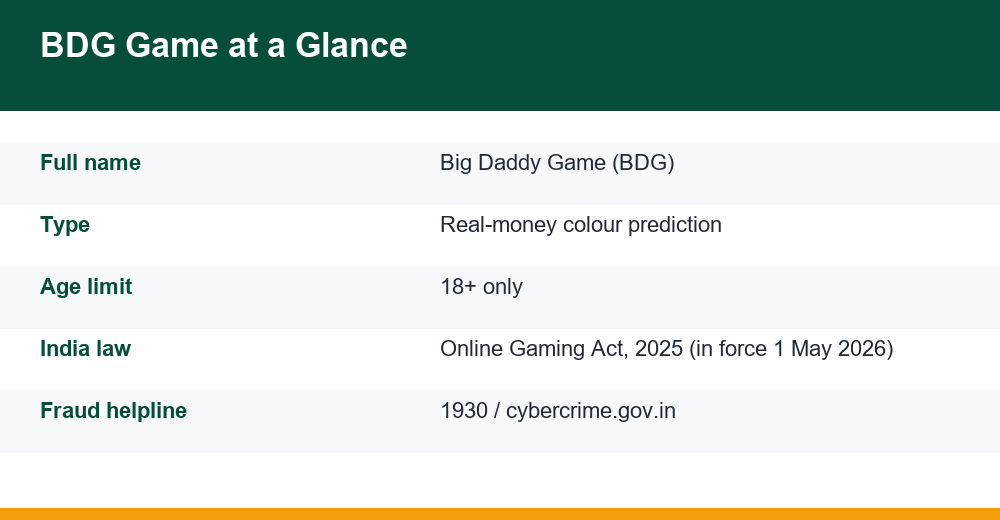
BDG Game, short for Big Daddy Game, is a real-money app aimed at players in India. Like the other colour-prediction platforms we cover on this site, it runs short timed rounds where a user picks a colour, number or size and the platform’s draw decides the result. Every round is a chance event, the payouts carry a built-in house edge, and over time the expected value for the player is negative.
Why focus on signing in? Because the account is where the money and personal data sit. A wallet balance, a linked UPI ID and a verified mobile number make these accounts attractive targets, and fraudsters often find it easier to trick a user at the moment of signing in than to break into the platform itself.
- Real money can be lost quickly, and no chart, ‘prediction group’ or strategy recovers it.
- These apps are for adults only (18+).
- These apps are generally not on the Google Play Store, so users rely on APKs and chat links, exactly where fakes thrive.
The Legal Position in India in 2026
Any honest guide has to start with the law. Parliament passed the Promotion and Regulation of Online Gaming Act, 2025, which prohibits offering online money games, bans their advertisement and promotion, and bars banks and payment systems from processing transactions for them.
According to notifications issued by the Ministry of Electronics and Information Technology in April 2026, the Act and the accompanying Online Gaming Rules, 2026 came into force on 1 May 2026, and an Online Gaming Authority of India was set up. Colour-prediction games played for real money fall within the kind of activity the Act targets.
The penalties are aimed mainly at those who offer, advertise or process payments for these games, but that does not make using them risk-free. Payment routes can be blocked without notice, platforms can disappear, and balances can become inaccessible however carefully you guard a password. This is not legal advice; if unsure, speak to a qualified lawyer.
Real Sign-In Pages vs Look-Alike Domains
Phishing pages copy the colours, logo and layout of a genuine sign-in screen almost perfectly. What they cannot easily copy is the exact web address. Fraudsters register domains that differ by a single letter, add hyphens or words such as ‘official’, ‘vip’ or ‘bonus’, or use unusual endings.
Before you type anything, read the address bar character by character. For a reference point, independent information pages such as this BDG Game login guide describe the usual sign-in flow, which helps you notice when a page asks for something out of the ordinary.
| Signal | Usually genuine | Red flag |
|---|---|---|
| Web address | Same address you saved and used before | Extra letters, hyphens, ‘vip’, ‘free’, odd domain ending |
| How you arrived | Typed or saved bookmark | Link from a stranger, Telegram group or SMS |
| Fields requested | Mobile number and password, OTP when needed | UPI PIN, card CVV, bank password, Aadhaar |
| Urgency | Neutral wording | ‘Account will be frozen in 10 minutes’ |
| App source | File you can trace to a known source | APK forwarded in a chat, renamed or ‘mod’ version |
Six Habits Before You Sign In
- Use a saved bookmark. Once you have confirmed an address, always sign in from that bookmark, never from a link someone sends.
- Check the address bar every time. A padlock only means the connection is encrypted, not that the site is genuine.
- Ignore links from strangers. Messages offering a ‘new login link’, ‘server shifted’ or ‘bonus login’ are a classic trap.
- Use a unique password. Do not reuse your email, banking or social media password.
- Keep OTPs to yourself. An OTP is meant for the screen you requested it from, never for a person.
- Review app permissions. Refuse SMS access, accessibility services or install prompts that appear after sign-in.
If any check fails, stop. Closing a tab costs nothing; entering details on a fake page can cost your savings.
OTP Hygiene and Safe Password Resets
One-time passwords protect you only while they stay private. Read the full SMS: genuine messages usually say what the code is for, and if it mentions a bank transfer or a different app, do not use it.
If an OTP fails to arrive, see our guide on what to do when an OTP is not coming on a gaming app for common causes, and never let a ‘helper’ in a chat group fix this by asking you to share the code.
Resetting a password safely
- Start the reset only from the page you reached through your own bookmark.
- A reset OTP you did not request may mean someone is trying to get in, so never share it.
- Choose a new password of at least 12 characters that you have never used elsewhere.
Locked Out, or an Agent Asks for Your Password?
Lockouts happen after repeated wrong attempts, a changed SIM or a security check. The worst response is to search for a ‘customer care number’ and call the first result, because fake helpline numbers are widely planted on forums and comment sections.
Many colour-prediction apps use referral ‘agents’ who recruit players. Whatever their role, an agent never needs your password, OTP, UPI PIN or screen-share access.
| Situation | Safe response |
|---|---|
| Too many wrong passwords | Wait for the timer, then use the reset option from your bookmark |
| Agent asks for password | Refuse, block the contact and change your password |
| Caller asks for OTP | Hang up; no genuine support needs it |
| Asked to ‘pay a fee’ to unlock funds | Treat as a red flag and stop all payments |
If you have already shared a password or OTP, act immediately: change the password, sign out any unknown devices if the app shows them, and tell your bank if a payment method is linked. Ignore strangers who offer to ‘recover’ lost money for a fee; that is a second layer of fraud.
Where to Get Help in India
If money has been taken or you suspect fraud, report it quickly. India’s national cybercrime reporting portal, cybercrime.gov.in, accepts complaints online, and the national helpline 1930 handles financial cyber fraud, where speed matters for freezing funds.
- Note dates, amounts, transaction IDs, phone numbers and the suspicious web address before they vanish.
- Call your bank’s official number, printed on your card or passbook, to block cards or UPI if needed.
Money games can also take a toll beyond the wallet. If chasing losses, stress or anxiety are building, the government’s Tele-MANAS mental-health helpline, 14416, offers free support. For broader habits that keep you safe across apps, read our guide to staying safe while using online earning apps.
Frequently Asked Questions
How do I know a sign-in page is real?
Use an address you saved yourself and check it character by character. Be suspicious of extra words, hyphens or odd domain endings, links from strangers, and pages that ask for a UPI PIN, card CVV or Aadhaar. A padlock only shows encryption, not that the site is genuine.
Should I share my OTP with an agent or support staff?
No. An OTP is only for the screen where you requested it. No genuine agent, support desk or bank needs your OTP, password or UPI PIN. If someone asks, refuse, block them and change your password straight away.
Are colour-prediction apps legal in India?
The Promotion and Regulation of Online Gaming Act, 2025 came into force on 1 May 2026 and prohibits offering and promoting online money games. Real-money colour prediction falls within that scope. This is general information, not legal advice; consult a lawyer for your situation.
What should I do if I have been defrauded?
Report it at once on cybercrime.gov.in or call 1930, then contact your bank through its official number to block cards or UPI. Keep transaction IDs, messages and web addresses as evidence. For emotional strain, Tele-MANAS on 14416 offers free support.
