Delete Gaming Account Permanently: 5 Essential Steps Done Right
Search for how to delete gaming account permanently and most of what you will find is uninstall instructions dressed up as deletion — that is the single thing the pages on this topic get wrong. Dragging an icon to the bin removes the app from your phone and nothing else: your profile, wallet history, KYC documents and linked payment methods all remain on the company’s servers, exactly as they were.
Genuine deletion is a request you make to the operator of the service, and doing it properly means doing things in the right order — money out first, then the formal request, then revoking what the app could still reach, then keeping proof. This breakdown walks through those steps for gaming apps generally, including what to do when the app offers no delete button at all. One honest note before we start: real-money gaming is for adults only, it carries financial risk, and losing is the expected outcome over time — if that is part of why you are leaving, closing the account properly is a sensible move.
Uninstalling, Deactivating and Deleting Compared
Three different actions get collapsed into one word in most articles, and the confusion is not accidental — it suits an app for you to believe you have left when your account, balance and payment links are all still live. Before doing anything, be clear about which of the three you are actually performing.
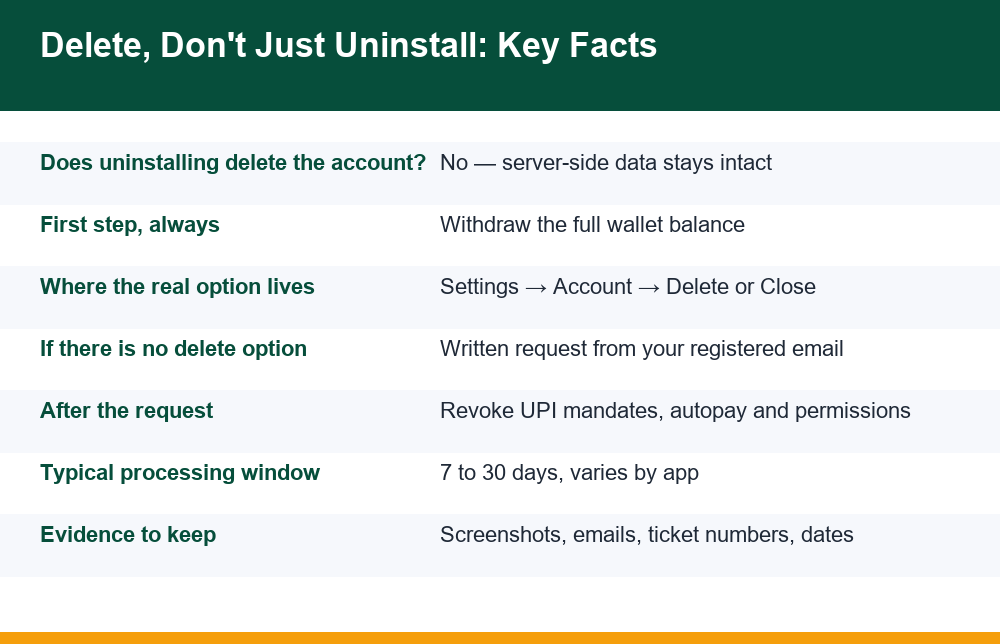
Uninstalling happens on your device. It frees storage and removes the icon. It does not notify the company, does not close the account, and does not stop any payment mandate you previously approved. Log in from any other phone and everything is still there. Deactivating (some apps call it freezing, pausing or self-exclusion) happens on the company’s side but is designed to be reversible — the account is hidden or locked, often with a one-tap reactivation path, and all data stays. Deleting is a formal request that the company close the account and erase or anonymise the personal data it holds, subject to whatever retention its privacy policy describes. Only the third one is what the phrase means.
| What you did | Where it acts | Account still exists? | Payments still possible? |
|---|---|---|---|
| Uninstalled the app | Your phone only | Yes, fully active | Yes — mandates and saved methods untouched |
| Deactivated / froze | Company server | Yes, hidden and reversible | Often yes, until separately cancelled |
| Requested deletion | Company server | Scheduled for closure | No, once mandates are also revoked |
A useful self-test: if you could get everything back by simply logging in again, you have not deleted anything. Several apps also run a grace period after a deletion request — commonly 7 to 30 days — during which logging in cancels the request silently. That detail alone explains many “I deleted it but it came back” complaints.
Delete Gaming Account Permanently: What That Actually Means
When you delete gaming account permanently, you are asking the operator to do three distinct things: close the account so it can no longer be used or recovered, erase or anonymise the personal data attached to it, and sever the financial connections — wallet, saved cards, UPI handles — that the account held. A request that achieves only the first of these is a half-measure, which is why the steps below treat money and permissions as part of deletion rather than an afterthought.
“Permanent” also deserves honest qualification. No consumer-facing service erases every trace the instant you ask. Transaction records, fraud-prevention logs and verification records are typically retained for a period the company sets out in its privacy policy, even after the account itself is closed. What permanence realistically means is: you can never log in again, the profile cannot be reactivated, marketing stops, and personal data is removed from active systems on the schedule the policy describes. How gaming apps collect, store and share that data in the first place is covered in our breakdown of what gaming apps actually do with your personal data, and reading it before you leave helps you ask the right questions on the way out.
The five steps that follow are sequenced deliberately. People who delete gaming account permanently without withdrawing first spend weeks chasing a balance inside an account they can no longer open; people who delete without revoking mandates discover an autopay still firing afterwards. Order matters more than speed here.
Withdraw Your Balance Before You Touch Anything Else
This is step one for a blunt reason: once an account is closed or even queued for closure, many apps freeze the wallet, and recovering money from a frozen wallet means support tickets, identity re-verification and waiting. Withdrawing while the account is in good standing is dramatically easier than extracting money from a closed one. Do not submit any deletion request until the wallet reads zero.
Withdraw everything that is withdrawable — the real-money balance and any winnings that have cleared. Be aware that bonus balances, promotional credits and locked winnings usually cannot be withdrawn and will simply lapse when the account closes; that is how those mechanics are designed, and it is worth knowing so the lapsed amount does not come as a surprise or, worse, tempt you into one more deposit to “unlock” it before leaving. Chasing a bonus on the way out is exactly the behaviour those credits exist to produce.
Three practical points while the money moves. First, withdrawals can take anywhere from minutes to several working days depending on the app’s processing and your bank, so build in waiting time before the next step. Second, screenshot the wallet showing zero after the withdrawal lands, with the date visible — this is the first piece of evidence in the file you are going to build. Third, download or screenshot your transaction history while you still have access to it; once the account is gone, so is your copy of the ledger, and if any dispute arises later you will want your own record of deposits and withdrawals rather than having to request it from a company you no longer have an account with.
The In-App Deletion Route, Step by Step
Both major app stores now push developers whose apps allow account creation to offer an account deletion path, so a growing share of gaming apps have a genuine in-app route — it is just rarely in an obvious place. It is almost never on the main screen and sometimes sits two or three menus deep, behind wording softer than “delete”.
- Open the app and go to Settings or your profile page, then look for sections named Account, Privacy, Security or Manage account.
- Look for Delete account, Close account, Remove account or Request account deletion. Treat “deactivate”, “take a break” or “logout from all devices” as different actions — they are not deletion.
- Follow the confirmation flow. Expect friction: retention offers, warnings that your balance and history will be lost, sometimes an OTP to your registered mobile or email. Friction is normal; read each screen so you know what you are agreeing to lose.
- Note the stated processing time and any grace period. If the app says the account will be deleted after a waiting period, do not log in during that window — on many apps a login cancels the request without telling you.
- Screenshot the final confirmation screen, and save the confirmation email or SMS if one arrives. Record the date and any reference number.
If the in-app flow exists, use it even if you also intend to email — it creates a timestamped record inside the company’s own systems. The app’s store listing often states whether in-app deletion is supported, which is a quick way to check before hunting through menus. And only after the request is submitted should you uninstall; people who want to delete gaming account permanently often uninstall first and then have to reinstall just to reach the deletion menu.
No Delete Option? The Email Route and the Evidence to Keep
Plenty of gaming apps, especially smaller ones, offer no deletion control at all. The absence of a button does not mean deletion is unavailable — it means you make the request in writing. Find the official support email or grievance contact in the app’s settings, its privacy policy, or its website footer, and write from the email address registered to the account, since that is how they verify the request is yours.
Keep the message short and specific: state your registered mobile number or username, say that you request permanent closure of the account and erasure of the personal data associated with it, confirm the wallet balance is zero (attach the screenshot), and ask two direct questions — how long processing takes, and what data will be retained afterwards and for how long. Ask for written confirmation when the deletion is complete. If the app has an in-app support chat instead, use it the same way and screenshot the conversation, including any ticket number.
Now the part most pages skip entirely: the evidence file. Keep every screenshot, email, chat transcript and ticket number in one folder, with dates. If the company processes your request properly, you will never need it. But if deductions continue after closure, if the balance was swallowed, or if the whole operation turns out to be a scam that simply ignores you, that file is what lets you act.
Financial fraud involving an app — money taken after a documented closure request, or a withdrawal that never arrived — can be reported through the National Cyber Crime Reporting Portal, and a dated paper trail of your deletion request is precisely the documentation such a report needs. No response after two written follow-ups roughly a week apart is itself worth documenting.
Revoke UPI Mandates, Permissions and Linked Logins
Deleting the account does not automatically dismantle everything the account was connected to. The deletion request travels to the company; mandates, device permissions and third-party logins live elsewhere and have to be cleaned up separately. This step is the difference between an account that is gone and an app that can still quietly touch your money or your data.
- UPI autopay mandates: open your UPI app, find the mandates or autopay section, and pause or cancel any mandate naming the gaming app or its payment processor. Do this even if you never knowingly set one up — recurring deposit mandates are sometimes approved in a hurry during a first deposit.
- Saved cards and wallets: if you stored a card inside the app, you cannot remove it after closure, which is one more reason to check saved payment methods before submitting the deletion request. Also check any linked third-party wallet for standing connections to the app.
- Device permissions: in your phone’s settings, review what the app could access — contacts, SMS, storage, location — before you uninstall. Our plain-language breakdown of which permissions gaming apps request and why explains which of these matter most.
- Third-party logins: if you signed up via a Google, Apple or social login, open that provider’s security settings, find connected or third-party apps, and remove the gaming app’s access so the connection cannot silently re-authenticate anything later.
- Notifications and marketing: unsubscribe from the app’s emails and SMS senders. Marketing that continues weeks after a confirmed deletion is a signal your data was not handled as promised — and it belongs in the evidence file.
Work through the list in one sitting if you can. Each item takes a minute or two, and together they close every channel the app had into your device and your bank.
KYC Documents and What Apps Keep After Deletion
The most sensitive thing a real-money gaming app holds is usually not your game history — it is the identity documents you uploaded during verification. Copies of government ID, selfies, bank details and address proof sit in the company’s verification systems, and the honest answer to “do they delete those when I delete the account?” is: not immediately, and sometimes not entirely.
Verification and transaction records are the category of data companies retain longest after closure, for fraud-prevention and record-keeping purposes set out in their privacy policies. Retention periods vary widely from app to app, and the privacy policy — usually under headings like “data retention” or “how long we keep your information” — is the only authoritative source for a given app. Read that section before you submit the request, and ask the retention question explicitly in your deletion email so the answer exists in writing. What verification actually involves, which documents apps genuinely need, and which requests are excessive is covered in our explainer on how KYC verification works in gaming apps.
Two realistic expectations. First, “erasure” in practice often means anonymisation — stripping records of identifiers rather than destroying every row. Second, data already shared with payment processors or verification vendors is governed by those parties’ own retention schedules, which your deletion request to the app does not directly reach. None of this makes requesting erasure pointless; it makes the written record of your request more valuable, because it fixes the date from which the company’s own stated retention clock runs.
How to Confirm the Account Is Really Gone
A deletion request is not a deletion. The final step is verifying, after the stated processing window has fully passed, that the account no longer exists — and this is the step almost nobody performs, which is why reactivated accounts go unnoticed for months.
Wait out the full grace period plus a few days, then test from the outside. Try to log in with your old credentials — the correct result is an error saying the account does not exist or the credentials are invalid, not a welcome-back screen, and not a login that succeeds. A successful login means the request was cancelled or never processed, and you are back to the written route with your evidence file in hand.
Then try the forgot password flow with your registered mobile or email: if the system still sends a reset code, a live account still recognises you. Check whether promotional SMS and email have stopped, and check your bank and UPI statements for the following month for any deduction tied to the app.
If every check comes back clean — login fails, no reset code, no messages, no deductions — the job is done, and the confirmation email you requested earlier is the closing document in your file. If any check fails, reply on the same email thread (keeping the history intact), state what you found and when, and ask for completion in writing. The thread, the dates and the screenshots are what turn “I think I deleted it” into “I can show I asked to delete gaming account permanently on this date, and here is what happened after.” That is the standard of proof worth holding yourself to any time money and identity documents are involved.
Frequently Asked Questions
Is uninstalling an app the same as deleting the account?
No. Uninstalling only removes the app from your phone; your account, wallet, transaction history and KYC documents all remain on the company’s servers, and any payment mandate stays active. Deleting the account is a separate request made to the company, either through an in-app deletion option or in writing from your registered email.
Should I withdraw my balance before deleting?
Yes, always — and before submitting the request, not after. Many apps freeze the wallet once an account is queued for closure, and recovering money from a frozen or closed account is slow and uncertain. Withdraw the full withdrawable balance, wait for it to reach your bank, screenshot the zero balance, and save your transaction history while you can still access it. Bonus and promotional credits usually cannot be withdrawn and will lapse.
How do I revoke UPI mandates and permissions after deleting?
In your UPI app, open the mandates or autopay section and cancel anything naming the gaming app or its payment processor. In your phone’s settings, review and revoke the app’s device permissions before uninstalling. If you signed up through Google, Apple or a social login, remove the app from that provider’s connected-apps list. None of this happens automatically when the account is deleted — each has to be done separately.
What if the app has no delete option?
Request deletion in writing. Find the support or grievance email in the app’s settings, privacy policy or website, and write from your registered email address stating your username or mobile number, requesting permanent closure and erasure of your data, and asking for the processing time and written confirmation. Keep the email, any ticket number and dated screenshots. If money is deducted after a documented closure request or a withdrawal never arrives, the evidence file supports a report through the National Cyber Crime Reporting Portal at cybercrime.gov.in.
Do apps keep my KYC documents after deletion?
Usually yes, for a period. Verification and transaction records are the data companies retain longest after an account closes, under the retention terms in their privacy policy, and erasure in practice often means anonymisation rather than instant destruction. Retention periods vary by app, so read the data-retention section of the privacy policy and ask the question explicitly in your deletion email so the answer exists in writing.
How do I confirm the account is really gone?
After the stated processing window plus a few days, try logging in — the correct result is an account-not-found or invalid-credentials error. Then try the forgot-password flow: if a reset code still arrives, a live account still recognises you. Check that promotional messages have stopped and watch your bank and UPI statements for a month for any deduction linked to the app. If any check fails, follow up in writing on the same email thread with dates and screenshots.
