KYC Verification in Gaming Apps: 5 Essential Facts Explained
The thing almost every page about KYC verification in gaming apps gets wrong is treating it as a single switch that flips from “unverified” to “verified”. It is not one check. It is at least two independent checks — an identity check on the document you upload, and a separate name-and-account check on the payout method you attach — and either one can quietly fail while the other passes. That is why so many people see a green “KYC approved” badge and still cannot move money out.
Most ranking articles either paste generic banking text that has nothing to do with app payouts, or walk you through uploading documents with no mention of when a request should make you stop. This breakdown covers both: how the process is normally meant to work, and where it stops being routine. One honesty line before anything else — these apps involve real money, real-money play carries risk, losses are the expected outcome, and nothing here is advice to play.
What KYC Verification in Gaming Apps Actually Covers
KYC stands for know your customer. In the context of KYC verification in gaming apps, it means the app is trying to establish three things at once: that you are a real person, that you are the same person each time you log in, and that the account receiving money belongs to you. Those are three different questions, and apps check them with different data.
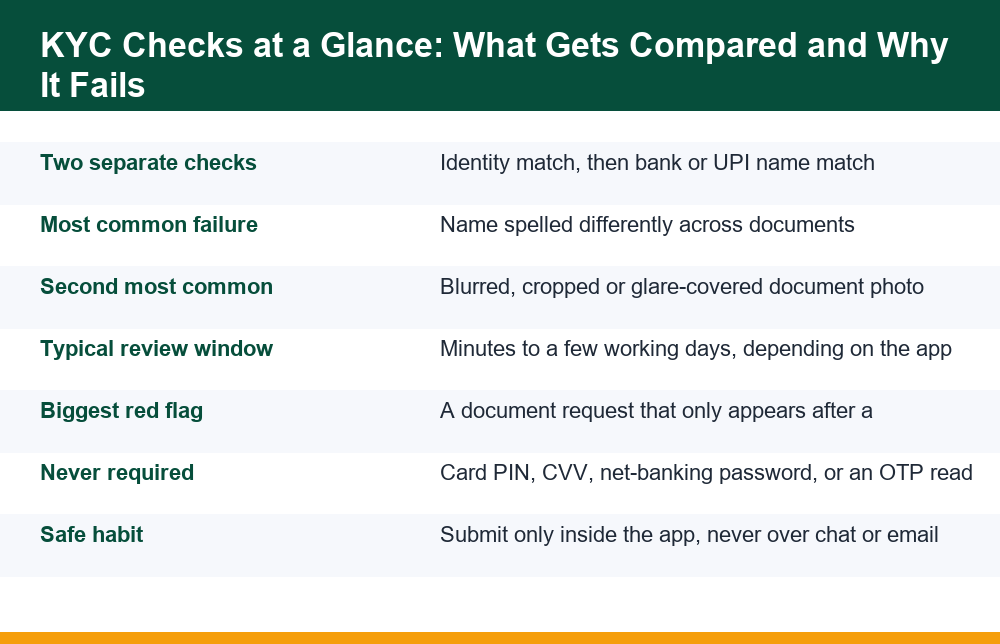
The identity part is usually handled by a document upload plus an automated read of the text on it. Software extracts your name, date of birth and document number, then compares them against what you typed when you registered. The account part is handled separately, often at the moment of your first payout, by comparing the registered name against the name the bank or UPI handle returns. In many apps these two checks are not linked to each other at all, which is exactly why a profile can show as verified while payouts stay stuck.
There is a third layer that is rarely explained: device and behaviour signals. Apps log the device, the network and the pattern of logins. If your documents are fine but you have signed in from several devices in a short window, a review can be triggered that looks identical to a KYC problem from the outside. If you are stuck at this stage, it is worth reading through the specific reasons a withdrawal can sit in pending status for days, because several of them have nothing to do with your documents at all.
Sequence matters more than most people expect. The identity check usually runs first and can be completed long before you ever request money. The account check only runs when a payout destination exists, so it is entirely normal for it to surface weeks later, on a day when you believed verification was already finished. Knowing which of the two is being re-run tells you which detail to fix: a document problem is fixed on the document screen, an account problem is fixed in your payout settings or at your bank.
- Identity match — name, date of birth and document number against your registered profile
- Document authenticity — whether the image looks like an original rather than a screenshot or a scan of a photocopy
- Payout account match — the bank or UPI account holder name against the profile name
- Duplicate check — whether the same document number already exists on another account
- Age confirmation — these are 18+ products and the date of birth is the gate
Why Gaming Apps Ask for PAN and ID Documents
The plain answer is that money movement is the trigger, not play. An app can let you browse, deposit and play for a long time without asking for anything. The request almost always appears when money needs to travel outward, because that is the point at which the app has to be sure the destination account is yours and not a stranger’s.
A PAN is requested because it is the identifier that payment providers and banks in India commonly use to tie a payout to a single named tax record. An Aadhaar or another photo ID is requested because it carries a face and a date of birth, which a PAN alone does not reliably confirm. A bank statement or a cancelled cheque is requested when the name returned by the payment rail does not match cleanly. Each document answers a different question, and that is why being asked for a second document after submitting a first one is normal rather than suspicious on its own.
What is not a sensible reason: being asked for documents in order to “unlock” a bonus, to “release” winnings that were advertised as already won, or to clear a fee. Those are sales mechanics dressed up as a verification step, and the distinction matters more than anything else on this page. The point of naming them here is to help you recognise the pattern, not to suggest any of it is worth chasing.
It is also worth knowing what an app does not need. A full bank statement with every transaction visible is more than most payout checks require; a first page showing the account holder name, account number and bank is usually the part being read. If an upload screen offers a choice between a masked and an unmasked document, the masked version is the smaller exposure for the same result. Giving the minimum that satisfies the check is a habit worth forming early, because once an image has been sent you cannot take it back.
| Document requested | What it is actually used for | Most common rejection reason |
|---|---|---|
| PAN card | Tying the payout to one named tax record | Name on PAN differs from the registered profile name |
| Aadhaar or photo ID | Face match and date-of-birth confirmation | Glare, cropped corners, or the address side uploaded instead of the front |
| Selfie or liveness check | Confirming the account holder is present | Poor lighting, glasses, or a photo of a photo |
| Bank statement or cancelled cheque | Showing the payout account belongs to you | Statement older than the app’s accepted window |
| UPI handle screenshot | Matching the handle’s registered name | Handle belongs to a family member |
Why Your KYC Verification Keeps Failing
Repeated rejection is almost never a judgement about you. In most cases it is a text-matching failure. Automated document readers are strict and literal: a middle name present on one document and absent on another, an initial expanded into a full word, a surname placed first on one and last on the other, or a single extra space can be enough to produce a match score below the threshold the app accepts.
The second large category is image quality. The reader needs flat, evenly lit, fully visible documents. Phone cameras introduce glare on laminated cards, and people instinctively crop tightly, which removes the border the software uses to confirm the document shape. A third category is the quiet one: the same document already exists on another account. If a family member used the same PAN earlier, a duplicate flag can block the new submission and the error message will usually not say so.
- Open your profile and write down the name exactly as it appears there, including spacing and initials.
- Compare it character by character against the name printed on the document you plan to upload.
- If they differ, correct the profile first rather than uploading again and hoping — resubmitting the same pair usually produces the same result.
- Photograph the document flat, in daylight, with no flash, keeping a visible margin on all four sides.
- Upload the original photo file, not a screenshot of it, and not an image that has passed through a messaging app.
- Wait out the stated review window before resubmitting; repeated submissions in a short period can trigger a manual hold.
There is a failure mode worth separating out: the support loop. You submit, you are rejected with a generic message, you ask why, and you are told to submit again. The way out of that loop is to stop guessing and ask one narrow question in writing — which field did not match. A specific question is far more likely to produce a specific answer than a general complaint, and the reply gives you something you can actually act on. Keep the reference number of every exchange, because a dated thread is the only record you will have if the matter goes further.
One more practical point. If verification passed but money still will not move, the problem has shifted to the payment layer rather than the identity layer. Understanding how a UPI payout is actually routed from an app to your bank makes it much easier to tell which of the two stages is holding things up, because the failure messages look similar but the fixes are entirely different.
Does the Name on Your Bank Account Need to Match?
Yes, and this is the hard constraint people most often try to work around. The payout account name has to correspond to the verified account holder. A payout to a spouse’s account, a parent’s account or a friend’s account will normally be rejected, and in some cases the attempt itself puts the account under review.
The reason is structural rather than arbitrary. Payment rails return the registered account holder name when an account or UPI handle is queried. If that returned name does not correspond to the identity on file, the app has no way to show that the money reached the right person. Apps that wave mismatched payouts through are the ones to be wary of, not the ones that refuse them.
Partial mismatches are the awkward middle ground. Many bank records hold a name in a shortened or differently ordered form than the one printed on a PAN. In that situation the usual route is to update the profile to match the bank record exactly, or to have the bank record corrected, rather than to argue the two are the same person. Support teams generally cannot override a rail-level name response, however reasonable the explanation sounds.
Two specific situations come up often enough to name. Joint accounts: the rail may return only the primary holder’s name, so a second holder’s payout can fail even though the account genuinely belongs to both. The fix is to use an account where you are the primary holder, not to keep retrying. Wallets and handles: a UPI handle created years ago may still carry an old spelling or a nickname, and the handle name is what gets compared, not the bank’s own record. Checking what a handle actually returns before attaching it saves a rejected payout and the review that can follow one.
When a Document Request Is a Red Flag
This is the part generic articles skip entirely, and it is the reason this page exists. A document request is routine when it comes from inside the app, before or at the point of a first payout, and asks only for identity and account-ownership documents. It stops being routine the moment any of the following appear. Treat these as reasons to stop, not as hurdles to clear.
- The request arrives by chat, SMS or email with a link, rather than inside the app’s own verification screen.
- You are asked for a card PIN, CVV, net-banking password, or to read out an OTP. No genuine verification step needs any of these — an OTP shared with another person is a transaction authorised by you.
- A fee is attached — a “verification charge”, “processing fee” or “tax deposit” required before your own money is released.
- You are asked to install a second app or a screen-sharing or remote-support tool so someone can “help complete” the process.
- The documents are requested only after you asked to withdraw a large amount, having been allowed to deposit freely for weeks with no checks at all.
- The requester asks for a signed blank page, a selfie holding a handwritten note with changing wording, or video of you reading a script.
- The request escalates — each submission is accepted, then followed by a new demand, with the payout always one document away.
The escalating pattern in that last point is the signature of a document-harvesting setup rather than a real check. A genuine check converges: it asks for a finite set, reviews it, and closes. A harvesting operation diverges, because the documents themselves are what is being collected. If you are seeing divergence, stop submitting. The broader habits that keep this from happening in the first place are worth reviewing in this breakdown of how to stay safe while using online earning apps, which covers the warning signs that appear long before the document stage.
One structural tell is worth adding, because it is easy to check and hard to fake. A real verification flow lives at a fixed address inside the app: the same screen, reachable from your profile, whether or not anyone has messaged you. A harvesting request has no fixed address — it exists only in the message that brought it. If you close the chat, open the app fresh and navigate to verification yourself, a genuine pending requirement will still be sitting there waiting. If nothing is waiting, nothing was ever required.
Is It Safe to Upload Your PAN Card to a Gaming App?
The honest answer is: it depends on where the upload lands, and you can usually tell. Uploading a PAN inside an established app’s own verification screen, over its own encrypted connection, is a different act from sending the same image to a person on a messaging app who says they work for that company. The image is identical. The exposure is not remotely comparable.
A PAN on its own is closer to an identifier than to a credential, so by itself it unlocks very little. It becomes far more dangerous in combination — PAN plus a photo ID plus a signature specimen plus a selfie is enough raw material for someone to attempt opening accounts or credit products in your name. This is why the escalating-request pattern described above matters so much more than any single document. The risk is cumulative, not per-file.
Practical risk reduction, where it is available: submit the minimum the app actually requires rather than everything it offers to accept; prefer a masked document option when the app provides one; avoid sending documents over any channel that keeps a copy you cannot delete; and never store document photos in a cloud gallery that is shared or synced to a device you do not control. None of this makes an upload risk-free. It narrows the blast radius if something goes wrong later.
Before any upload, spend ten seconds on the channel itself rather than the document. Did you reach the screen by opening the app yourself, or by tapping something in a message? Does the screen belong to the app you installed, or to a browser page that looks like it? Is anything being asked for beyond identity and account ownership? Those three questions separate almost every safe upload from almost every regretted one, and none of them require you to know anything technical. A document sent into the wrong channel cannot be recalled, which is why the check belongs before the tap rather than after it.
Checklist Before You Submit Identity Documents Online
Run through this before any upload, on any app. It takes two minutes and it catches both the boring rejections and the genuinely bad situations. Treating KYC verification in gaming apps as a step to rush through is how people end up with both — a rejected submission and a document sitting somewhere it should not be.
- Confirm where you are. You should be inside the app you installed, in its own verification section — not in a browser page that a message linked you to.
- Confirm who asked. If the request came from a person rather than the app interface, treat it as unverified until the same request appears in the app itself.
- Confirm what is being asked. Identity and account ownership only. Any credential, PIN, password or OTP request ends the process.
- Confirm no money is involved. A real verification step never requires you to pay to complete it.
- Check your own details first. Profile name, date of birth and payout account name should already match the document before you upload anything.
- Check the image. Flat, sharp, full document visible, no glare, no heavy crop, original file rather than a forwarded copy.
- Note what you sent and when. A simple dated list of which document went where is the single most useful thing you will have if you ever need to raise a complaint.
- Stop if the asks keep growing. Converging requests are normal. Expanding ones are not.
One habit worth adding permanently: never submit documents while you are in a hurry to get a payout out. Time pressure is the condition under which every item on that checklist gets skipped, and it is precisely the condition a harvesting setup tries to create.
It also helps to keep the record outside the app. Screenshots of the submission screen, the confirmation message and the reference number, stored in a folder with the date in its name, cost nothing to keep and are the only version of events that does not depend on an app continuing to show you your own history. People who end up with a clean outcome in a disputed case are almost always the ones who kept this kind of record from the first upload rather than starting it after something went wrong.
If You Think Your Documents Have Been Misused
Act on the assumption that speed matters, because it does. Stop all further submissions to the channel in question immediately, and do not send a “final” document in the hope of resolving things. Change the password on the email address and the phone-linked accounts associated with the app, since those are the recovery routes someone with your documents would try next. Keep every screenshot, message, transaction reference and timestamp you have, in one place and unedited — a reconstruction written later is far weaker than the original screens.
If money has already moved, or if you believe identity documents are being used to open accounts in your name, report it through the official government channel rather than through the app alone. Complaints can be filed on India’s National Cyber Crime Reporting Portal, which is the route the Government of India provides for reporting online financial fraud and is also where a tracked acknowledgement number comes from. Reporting early preserves options that close quickly once funds have been moved onward.
Alongside that, notify the bank or payment provider whose account was involved so the receiving end can be flagged, and keep your own written record of every call reference you are given. None of this guarantees recovery. What it does guarantee is that there is a documented trail with dates on it, which is the one thing that is impossible to create after the fact.
It is also worth watching the quieter aftermath for a while. Unexpected messages about accounts you did not open, verification codes you did not request, or credit enquiries you cannot place are the signals that a document set is being used somewhere, and they often appear weeks after the original incident rather than days. Treat each one as something to check rather than ignore, and keep adding to the same dated record you started at the beginning.
The short version of everything above: KYC verification in gaming apps is two checks, not one; most failures are spelling and image problems rather than suspicion; a name mismatch on the payout account is a hard wall, not a negotiation; and the direction of a document request tells you more than its content. A real check narrows. Anything that keeps widening is not verification at all.
Frequently Asked Questions
Why do gaming apps ask for KYC documents?
Because money needs to travel outward. Apps verify three separate things — that you are a real person, that you are the same person on each login, and that the payout account belongs to you. A PAN ties the payout to one named tax record, a photo ID confirms a face and date of birth, and a bank statement or UPI handle shows account ownership. Each document answers a different question, which is why a second request after the first one is often routine rather than suspicious.
Is it safe to upload my PAN card to a gaming app?
It depends almost entirely on the channel. Uploading inside the app’s own verification screen is a different act from sending the same image to someone on a messaging app who claims to work there. A PAN alone is closer to an identifier than a credential, so its risk is low in isolation and much higher in combination with a photo ID, signature and selfie. Submit the minimum required, use a masked option if offered, and never send documents through a channel that keeps a copy you cannot delete.
Why does my KYC verification keep failing?
Usually text matching rather than suspicion. A middle name present on one document and absent on another, an initial expanded to a full word, a reversed surname order or an extra space can drop the match score below the accepted threshold. The next most common causes are image quality — glare on a laminated card, tight cropping that removes the document border, or a forwarded screenshot instead of the original file — and duplicate flags, where the same document number already exists on another account.
Does the name on my bank account need to match my app account?
Yes, and it is a hard constraint. Payment rails return the registered account holder name when an account or UPI handle is queried, so a payout to a spouse’s, parent’s or friend’s account will normally be rejected and may put the account under review. Partial mismatches, where a bank holds a shortened or reordered version of your name, are normally fixed by aligning the profile to the bank record exactly — support teams cannot override a rail-level name response.
Can an app misuse my KYC documents?
Documents can be misused, which is why the pattern of requests matters more than any single file. A genuine check converges: a finite set is requested, reviewed and closed. A harvesting setup diverges — each submission is accepted and followed by a new demand, with the payout always one document away. Requests arriving by chat or email with a link, demands for a PIN, CVV, password or OTP, fees to release your own money, or requests for signed blank pages and scripted videos all point away from verification.
What should I check before submitting identity documents online?
Confirm you are inside the app’s own verification screen rather than a linked browser page; confirm the request appears in the app and not only from a person; confirm only identity and account-ownership documents are being asked for, never credentials or OTPs; confirm no fee is attached; check your profile name, date of birth and payout account name already match the document; photograph the document flat and uncropped and upload the original file; and keep a dated note of what you sent and where. Stop if the requests keep expanding.
