Withdrawal Stuck in Processing? 9 Honest Reasons and Real Fixes
You requested a payout three days ago and your withdrawal stuck in processing has not moved since — the app shows the same status, support sends the same copy-paste reply, and the money is in neither your bank account nor your app balance. This is one of the most common wallet problems in gaming and earning apps, and it is rarely random. Behind that one vague word, “processing”, sit a handful of very specific causes: review queues, name mismatches, bonus locks, verification gaps and silent reversals.
This breakdown explains what the status really covers, how to tell a delayed payout from a dead one, and exactly what to record before you complain anywhere. One honesty note before anything else: this page is for readers 18+, real-money play carries risk, and losses — not stuck withdrawals — are the expected outcome of playing over time.
What Processing Actually Means Inside the App
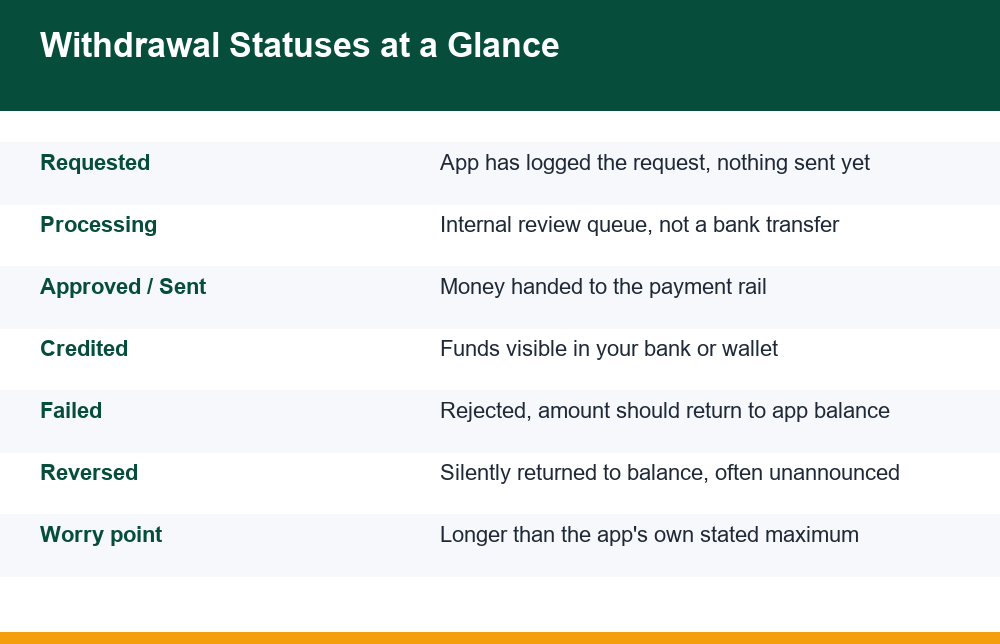
The first thing to understand is that “processing” is an internal label, not a banking status. When an app marks a withdrawal stuck in processing, in most cases no money has left the operator at all. The request is sitting in the app’s own review queue, waiting for an automated check, a human approver, or a batch job that runs a few times a day. Your bank has never heard of the transaction yet, which is why calling the bank at this stage almost never helps.
A typical payout passes through several internal gates before anything touches a payment rail. The app first checks that the amount is actually withdrawable — that it is not bonus money, not locked behind playthrough conditions, and not above a daily cap. It then checks the account itself: is identity verification complete, does the registered name match the payout account, has the account triggered any risk flag. Only after all of that does the request go to a payment processor, and only then does a real bank-side transfer begin.
This matters because each gate fails differently. A payout held at the balance gate usually reverses quietly. One held at the identity gate stays frozen until documents are sorted — the mechanics are covered in this breakdown of how identity verification works in gaming apps. One that failed at the bank stage will often show a specific error from the payment processor. Knowing which gate you are stuck at tells you which fix is even possible, and it is the first thing worth working out before you send a single support message.
Queued, Failed or Silently Reversed: Telling Them Apart
Apps use wildly different wording, but almost every stalled payout is in one of three real states. Queued means the request is alive and waiting its turn. Failed means it was rejected somewhere along the chain and should bounce back to your app balance. Reversed means the app pulled it back itself — sometimes with a notification, often without one. The dangerous confusion is that all three can display as “processing” for days.
| State | What you see | Where the money is | What it tells you |
|---|---|---|---|
| Queued | Status unchanged for hours or days | Still with the operator | Normal up to the app’s stated window |
| Failed | Status flips to failed/rejected, or stays stuck then errors | Should return to app balance | A gate rejected it — find out which one |
| Reversed | Withdrawal disappears from history or balance quietly rises | Back in your app balance | A manual or risk-triggered pullback |
| Sent | Marked approved/paid but bank shows nothing | With the payment rail or bank | Only now is a bank-side trace relevant |
The single most useful diagnostic for a withdrawal stuck in processing is your own balance. If the withdrawn amount silently reappeared in your app balance, the withdrawal is over — it reversed, and waiting longer achieves nothing. If the balance is still reduced and the status has not changed, the request is probably queued. If the app says paid and your bank shows nothing after the transfer window, the problem has moved outside the app, and a transaction reference number becomes the key piece of evidence.
Check your withdrawal history, not just the status banner. Many apps keep a transaction log that shows a reversal entry even when no notification was sent. Screenshot that log as soon as you notice anything odd, because some apps prune or rewrite history entries later.
9 Honest Reasons a Withdrawal Stuck in Processing Will Not Move
Affiliate pages tend to list two polite reasons — “high volume” and “bank delays” — because the honest list makes operators look worse. Here is the fuller picture, roughly in order of how often each one is actually the cause.
- Manual review queues. First withdrawals, large amounts and round-number amounts are commonly routed to a human reviewer. A queue measured in days is a staffing choice, not a technical fault.
- Incomplete identity verification. The app let you deposit and play without documents, but the payout gate demands them. The request sits frozen until verification completes.
- Name mismatch. The name on your app profile does not exactly match the name on the bank account, UPI handle or wallet receiving the money. Covered in detail below.
- Bonus or wagering locks. Part of your balance came from a bonus whose conditions are not met, and the system will not release funds until the maths resolves.
- Risk and fraud flags. Multiple accounts on one device, a VPN, a sudden win pattern or a chargeback history can push a payout into an indefinite security hold.
- Payment processor rejection. The processor bounced the transfer — wrong account details, an inactive account, or the processor itself refusing the merchant category.
- Operator liquidity problems. An app that is slow-paying everyone at once is often short of money. Community-wide complaints appearing at the same time are the signature.
- Batch and cut-off timing. Some apps genuinely process payouts only in batches, on business days, inside working hours. A request made before a weekend can legitimately sit for days.
- Deliberate friction. Some operators simply slow payouts hoping you will cancel the withdrawal and play the balance instead. If cancelling is easy but withdrawing is slow, treat that as information.
Notice that only two of the nine are outside the operator’s control. That is worth remembering when support blames “the bank” on day two, before any bank was ever involved.
Name Mismatch Holds: The Quiet Payout Killer
Of all the causes above, the name mismatch hold generates the most confusion, because nothing looks wrong to you. The app took your deposits without complaint, the account works, and yet the payout sits frozen. The reason is asymmetry: deposits are checked loosely, withdrawals strictly. At payout time the system compares the name on your profile, the name on your verified identity document, and the name on the receiving account — and many systems demand an exact character-level match across all three.
Common real-world triggers include a shortened first name on the app profile versus a full legal name at the bank, a missing middle name, initials versus expanded names, spelling variants of the same name, and payout accounts that belong to a spouse, parent or friend. The last one is the most serious: paying out to an account in a different person’s name is treated as a third-party payment, and most systems will hold it indefinitely rather than send it.
The fix is unglamorous: make the three names match before re-requesting anything. That usually means correcting the app profile to your legal name as printed on your identity document, and withdrawing only to an account held in that same name. If the app’s profile fields are locked after verification, support has to change them, and that request is far more likely to succeed when you attach the document showing the correct name. If the mismatch arose because you lost access to the originally registered details, sort the account itself out first — this walkthrough on recovering access to a gaming account covers that path step by step.
Bonus Money and Wagering Locks on Your Balance
The second quiet payout killer is balance composition. Your app balance looks like one number, but internally it is often two or three pots: deposited money, winnings, and bonus-derived funds. Bonus-derived funds typically carry playthrough conditions, and many systems refuse the entire withdrawal — not just the bonus portion — while any condition is unmet. The app rarely explains this in the withdrawal screen; the request just sits.
Worse, some systems void a pending withdrawal if you keep playing while it processes, because play can re-trigger bonus terms or change the withdrawable amount. If you have ever had a payout vanish after a few more rounds, that mechanism is the likely cause. The safest behaviour while a withdrawal is pending is simply not to touch the balance at all.
To diagnose a bonus lock, dig into the promotions or bonus section of the account and look for any active offer with a progress bar or turnover figure. If one exists, your payout is probably waiting on it. What those multipliers and turnover figures actually mean in money terms is unpacked in this plain-language explainer of what a wagering requirement really costs you. A warning rather than a tip: bonus mechanics exist because they favour the operator, and no pattern of play converts a locked bonus into reliable withdrawable money — the conditions are designed so that losses remain the expected outcome.
How Long Is Normal Before You Should Worry
There is no universal number, but there is a sound method: the app’s own stated processing window is the yardstick, and the worry point is when that window is exceeded, not when you get impatient. Most apps publish a window somewhere — in the withdrawal screen, the FAQ or the terms — commonly something like 24 to 72 hours of internal processing plus a bank transfer time. Find that number first, because “it has been ages” carries no weight in a complaint, while “your own policy says 48 hours and it has been 120” does.
A reasonable personal timeline for a withdrawal stuck in processing looks like this:
- Inside the stated window: do nothing except screenshot the request and the stated policy. Contacting support now wastes a message and often resets nothing.
- Window exceeded: send one clear support message quoting the request ID, the date, the amount and their own stated window. Ask one question: which stage is the payout at.
- 48 hours after that with no substantive answer: send a follow-up stating that you are preparing a formal complaint, and start assembling the evidence trail described below.
- App says paid but bank shows nothing after the transfer window: ask support for the UTR or transaction reference and take that to your bank — this is the only stage where the bank can actually trace anything.
First withdrawals deserve extra patience, because identity checks legitimately run only once. A fifth withdrawal that suddenly stalls on an account that previously paid out in hours is a much stronger warning sign than a slow first payout — something changed, and it is usually a flag, a bonus, or the operator’s cash position.
Cancelling and Re-Requesting: What It Actually Does
The most tempting button under a withdrawal stuck in processing is cancel. Sometimes it helps; more often it hurts. What cancelling actually does is delete your request and return the funds to your balance — which also deletes your place in the processing queue and the paper trail of the original request. Re-requesting puts you at the back of the same queue that just took days, and if the underlying cause was a mismatch, a lock or a flag, the new request will stall on exactly the same gate.
There are only two situations where cancel-and-retry is genuinely rational. First, when you made a correctable input error: wrong account number, wrong payout method, wrong amount relative to a limit. Fix the detail, re-request once, and note both request IDs. Second, when support explicitly tells you the request errored and asks you to resubmit — keep that instruction in writing. Outside those two cases, a stuck request is more useful alive than cancelled, because a pending unpaid request is itself evidence, while a cancelled one looks, in the operator’s records, like a withdrawal you chose to withdraw.
Also be aware of the behavioural angle: some apps make the cancel button prominent on pending withdrawals precisely because a meaningful share of users will cancel and play the money back. Every day a payout sits “processing” is a day that button works on you. Recognising that design pressure for what it is makes it easier to resist.
The Evidence Trail to Build Before You Escalate
Complaints fail for one dominant reason: they are stories, not records. “The app is not paying me” gets a template reply. A documented file with identifiers, timestamps and screenshots gets attention, because it signals you can take the matter further. Build the file before you escalate anywhere, while everything is still visible in the app.
- Screenshot the withdrawal request showing request ID, amount, date, payout method and current status — and re-screenshot whenever the status changes.
- Screenshot your transaction history, including deposits, so the flow of money into the account is documented alongside the stuck payout.
- Save the app’s stated processing window — the FAQ page, terms section or in-app notice, with the date visible.
- Export or screenshot every support exchange, with dates. In-app chat logs can vanish; email yourself copies.
- Record your account details as registered: profile name, verified document name, payout account name — this settles any mismatch question instantly.
- If the app claims it paid, get the UTR / transaction reference in writing and your bank statement for the relevant dates showing no credit.
With that file assembled, escalate in order: the app’s own formal complaint channel first (not the chat widget — look for a grievance or complaints email), then the payment provider if one was involved, then an official consumer grievance channel. In India, the Department of Consumer Affairs runs the National Consumer Helpline portal, where a grievance can be registered online and receives a docket number that creates a tracked record. Whichever route applies where you live, the pattern is the same: identifiers, dates, amounts, their own stated policy, and a precise ask — “release withdrawal request #X of [amount] dated [date], now outside your stated window”.
One closing reality check. A withdrawal stuck in processing is sometimes a queue, sometimes a fixable mismatch, and sometimes a sign the operator does not intend to pay. The evidence trail serves you in all three cases — it speeds up the fixable ones and documents the bad ones. And if chasing stuck money has itself become a source of stress, or you notice you keep depositing while payouts stall, free confidential support such as GamCare or BeGambleAware exists for exactly that conversation.
Frequently Asked Questions
What does processing actually mean in a withdrawal?
In most gaming and earning apps, processing means the request is sitting in the operator’s internal review queue — balance checks, identity checks and risk checks. No money has usually left the app at that stage, and your bank has no record of the transaction yet. A real bank-side transfer only begins once the status moves to approved, sent or paid.
How long should processing take before I worry?
Use the app’s own stated window, not a feeling. Most apps publish an internal processing time — often 24 to 72 hours — plus bank transfer time. Inside that window, waiting is normal, especially on a first withdrawal where identity checks run once. The worry point is when the app’s own stated maximum is exceeded; from there, contact support once with the request ID and start keeping records.
Why did my withdrawal fail after showing processing?
Because processing is a series of gates, and the request cleared some but not all of them. Common late failures are a name mismatch between your profile and the payout account, incomplete identity verification, an unmet bonus or wagering condition, a risk flag, or the payment processor rejecting the account details. The failed amount should return to your app balance — confirm that it actually did.
Can a withdrawal reverse back to my wallet silently?
Yes. Many apps return a blocked payout to your app balance without any notification — the withdrawal simply disappears from pending status while your balance quietly rises. Check your balance and transaction history rather than relying on alerts, and screenshot the history entry if you find a reversal, since it shows the app pulled the payout back itself.
Does cancelling and re-requesting help?
Rarely. Cancelling deletes your place in the queue and the record of the original request, and a new request hits the same gate that stalled the first one. It only makes sense when you entered a correctable detail wrongly — such as the account number or amount — or when support explicitly asks you in writing to resubmit. Otherwise a pending unpaid request is stronger evidence than a cancelled one.
What evidence should I collect before complaining?
Screenshots of the withdrawal request with its ID, amount, date and status; your full transaction history including deposits; the app’s own stated processing window; every support exchange with dates; your registered profile name versus the payout account name; and, if the app claims it paid, the transaction reference plus a bank statement showing no credit. Identifiers and dates turn a story into a case.
